2. Data
Data types
- Boolean (True/False)
- Text characters
- Numbers:
- integer (signed/unsigned)
- non-integer (floating point, fixed point)
- Sounds and other unidimensional signals
- Raster images
Binary data representation
Computer operates solely on groups of bits, treating them as binary numbers
Usually binary words of lengths
Non-numeric data must be expressed using numbers
Alphanumeric data
Every character is represented by a number denoting its position in code table
Most frequently used codes:
ASCII - 128 positions
Extended ASCII - 256 positions
128 original positions, new ones - national characters, special symbols
EBCDIC - 256 symbols, mainly used by IBM
UNICODE - Initially 216, currently 221 positions
contains over 150000 characters
covers all alphabetic characters used in the world
ASCII
American Standard Code for Information Interchange
128 positions, 95 visible and 33 invisible
Invisible - codes 0...31 0x00..0x1f and 127 (0x7f)
white spaces, formatting codes, transmission and device control
Visible - codes 32...126 (0x20...0x7e)
space (code 32)
digits
latin letters
punctuation marks
common mathematical symbols
To remember:
Control codes - positions 0...31
7 - Bell/Alert (BEL)
8 - Backspace (BSP)
9 - Horizontal tab (HT)
10 - Line feed (LF)
12 - Form feed (FF)
13 - Carriage return (CR)
Space - 32 (0x20)
Digits - codes 48...57 (0x30...0x39)
Letters:
Uppercase - 65...90 (0x41...0x5a)
Lowercase - 97...122 (0x61...0x7a)
Distance between uppercase and lowercase - 32 (0x20)
Other visible chars - 33...126
Cancel/delete - 127 (0x7f)
UNICODE
21-bit character code designed to include all alphabetic characters used in the world
Symbolic notation of a character - U+<hex_code>
UTF-8 is the most common representation
Char represented by 1...4 octets
Text strings
Sequence of characters. Must have an indication of the end.
Two conventions:
- End of string marked with a special code
- Set known length of the string stored before the text
Sounds and images
Sound
- Sample of voltages (freq. 8 - 48kHz) saved as integer numbers
Images:
- Rectangular arrays of square picture elements (pixels)
- Every pixel has an assigned color - represented by three primaries (RGB)
- Values of primaries stored as unsigned integer numbers
Units of information
bit (b) - 1 or 0
octet (o) - 8 bits
byte (B) - smallest unit of information addressed by computer, usually 8 bits
word - unit of information operated on by the computer (1, 2, 4, 8, 16, bytes)
processor word - unit of information operable by the processor (us. 32/64b)
memory word - unit of information that may be transferred in a single cycle between processor and memory (us. 64/182b)
Computers operate on words - groups of 2n bits
common word lengths - 8, 16, 32, 64, 128b
Some computers are capable of operating on single bits and bit fields of arbitrary widths
Data stored as words in memory
Logical (boolean) data
False, is always saved as series of 0s - 00...00
But True can be saved in different ways:
- C => 00..01
- Most languages => any non-zero value
- Visual Basic => 11..11
This is important for logical operations - overall and bit-wise
Unsigned integers
Used for fixed point decimal numbers
Decimal digits encoded in binary - 4 bits (nibble, tetrade) per digit
Allowed nibble values - 0...9
Formats:
- packed - 2 digits per octet, octet value range 0...99
- unpacked (ASCII) - one digit per octet, value range 0...9
Signed integer representations
How to correctly interpret an negative value number?
It must hold after negation functions.
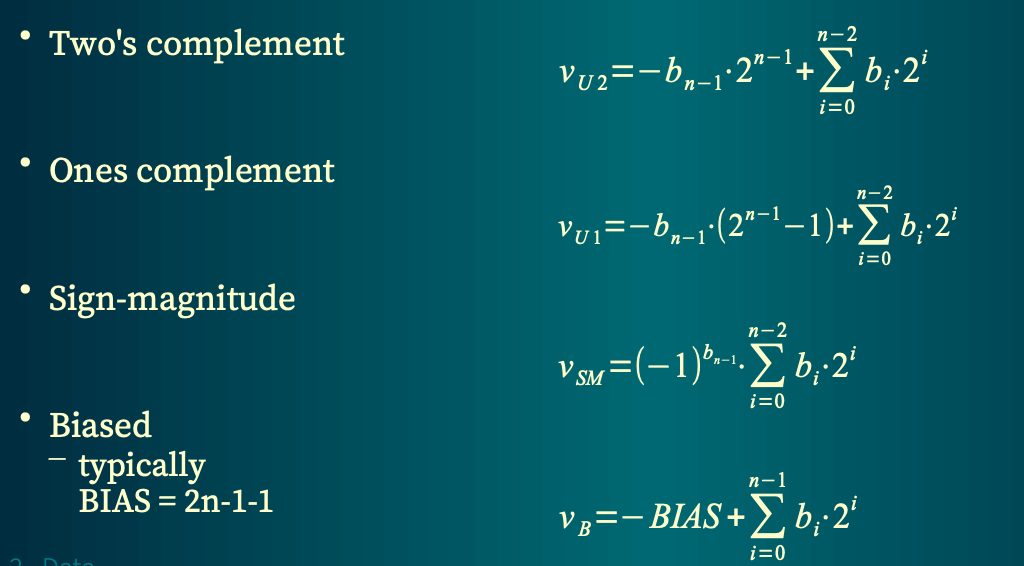
Representation of zero
Ones complement and sign-magnitude have two representations of zero
- Ones complement - 11...11 and 00...00
- Sign-magnitude - 10...00 and 00...00
Negate operations - Ones' complement - ~x
- Two's complement - ~x + 1
- Sign-magnitude - negate sign bit
- Biased - BIAS - x
Fixed point notation
Obtained by shifting bit weights in integer notation
2-f, where f - no. of bits in fractional part
Used for 2's complement and unsigned numbers
Commonly used formats
- One or two bits of integer part, rest as fractional
- Half of the word as integer, rest as fraction
Arithmetic operations similar to integer operations - Scaling (shifting) required during multiplication and division
- Do not require special instructions or hardware structures
Binary floating point
Examples:
Elements:
- Sign
- Significand unsigned fixed point number
- Exponent (signed integer) sys base 10 is fixed
Normalized form - integer part of significand is expressed using single non-zero digit
Binary floating point notation
If possible, numbers are stored in normalized form
Exponent field special values:
00...00 - denormalized form
11...11 - Not-a-Number
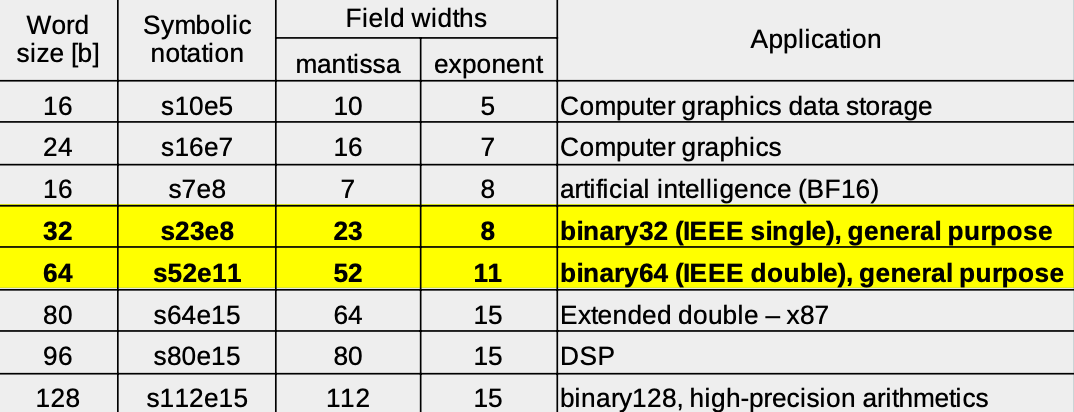
Exponent is stored in e-bit wide field as biased value
BIAS =
Common formats
Floating point arithmetic
Floating the point is an approximation, so the result of the arithmetic operations are also approx.
Result may depend on order of operations
- Addition and substraction should be performed in order of growing magnitude
- if a << b, then a+b may be equal to b
Equality test usually gives false result
- Use
instead
Precision of IEEE single (24 bits) is smaller than that of 32-bit integer or fixed point
Memory organization
In g.p. computers, 8-bit byte is the smallest addressable unit of memory
Multibyte data occupy the appropriate number of consecutive byte-sized memory locations
Multibyte data addressing
Little Endian - least significant byte of data word at the lowest address
Big Endian - most significant byte at the lowest address
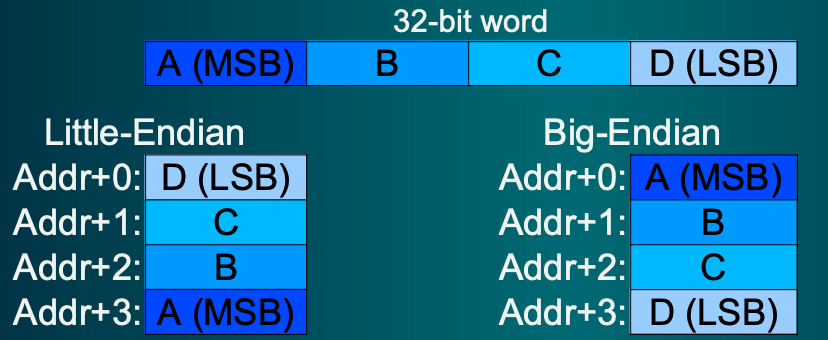
Little Endian
Byte numbering corresponds to bit weights
Natural for computers, not for humans
Type casting preserves pointer value
Big Endian
Natural for humans
Type cast changes the pointer value
Fast string compare is possible
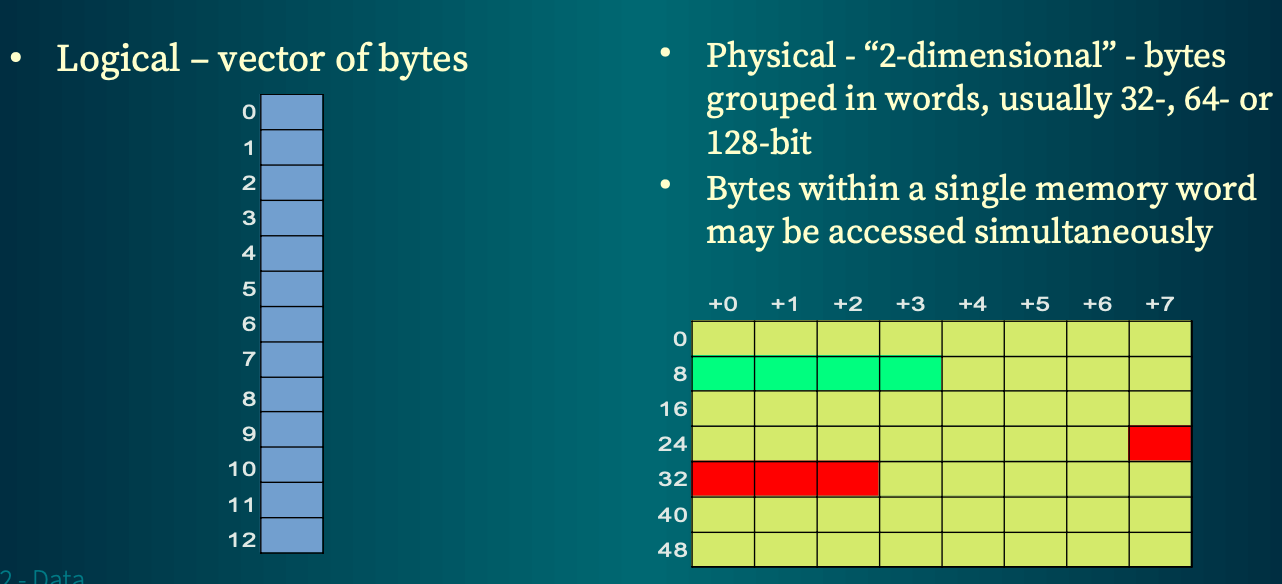
Logical vs. physical memory organization
Data alignment
Physically the memory is organized as vector of words, word being vector of bytes
Any number of bytes within a single word may be accessed at the same time
Memory word is usually at least as long as the processor's word
The access to multibyte data in a single memword is faster than in case of it being split into 2 memwords (2 addresses are needed)
New archs enforce placement of every data item ensuring the fastest possible access
Size alignment
For the fastest access regardless the physical memory width, each item is places in memory at the address divisible by its length (rounded up to
Newer archs enforce size alignment, as it boosts efficiency
Each data type is characterized by two values:
- Alignment - data starting address must be a multiple of alignment (_Alignof() in C)
- Size - must be a multiple of alignment
(sizeof() in C)
in modern implementations, size is alwaysand equal to alignment
Vectors and arrays
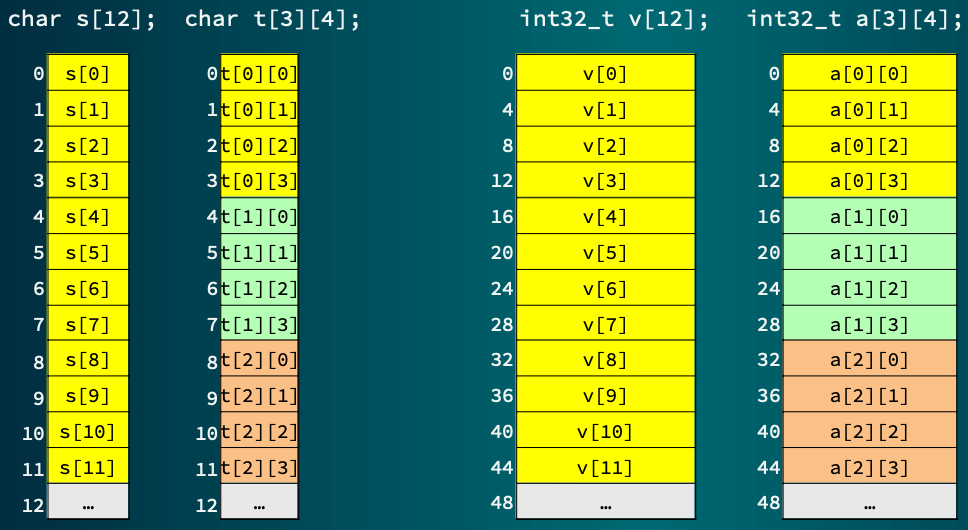
The elements of vector occupy the consecutive memory locations, starting with the first element
Vector alignment is the same as its element alignment
Structures
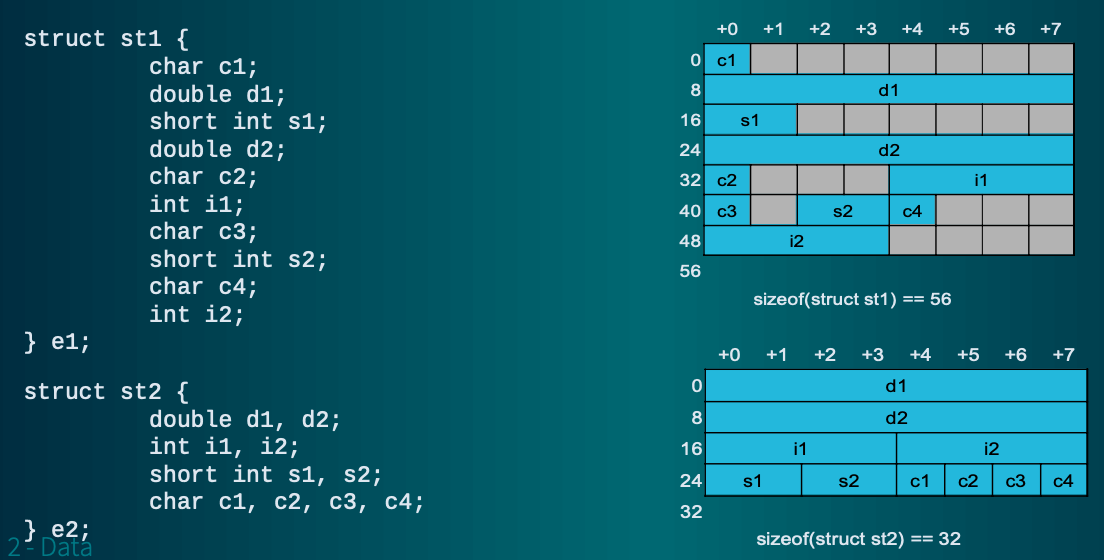
Compiler is required to preserve the order of fields from the declaration. It cannot optimize the layout of a struct
Each field must be aligned according to its type requirements
Padding (unused bytes) is added between fields to achieve proper alignment
Structure must be aligned according alignment requirement of the field with the biggest alignment
Structure is padded to the multiple of its alignment
In C - sizeof() returns the offset between two structures of a given type, necessary for allocating a vector of structs
x86 AVX vector unit
AVX is a vector unit of x86 processors
16 256-bit registers
AVX2 supports 256-bit integer vectors
New extension (AVX-512) supports 512-bit vectors