Chapter 1
Definitions
Assembler - converts source (assembly) code into machine language
Linker - combines multiple object files created by assembler into one executable file
Debugger - allows stepping through a running program to examine registers and memory
MASM Programs:
- 32-bit (protected) mode - runs on all x86 and x64 Windows
- 64-bit mode - runs on x86 Windows
Machine Language - numeric language understood by CPU
Assembly Language - lowest human-readable language. Has 1-to-1 relation with machine language
One assembly instruction is converted into one machine instruction
High-level languages have one-to-many relation, where one HLL instruction can be expanded into multiple machine instructions
High-Level Languages - (C++, Python). Have 1-to-many relation
Registers - storage in CPU holding intermediate results of operations
Assembly Usage
Assembly language is NOT portable
Each family of processors has its own version of assembly language
Almost every high-level language is portable
Good Assembly Use-Cases
- embedded programs (in AC controller)
- real-time hardware monitoring
- game consoles software
- device drivers
Virtual Machine Concept
Computer by itsself can only execute machine code. (L0)
For humans, it's not understandable, so we write higher-level code (L2)
Sometimes, that is not flexible enough, so we create higher levels (L3)
For computers to understand L1 code, we have two possibilities:
- Interpretation - each L1 instruction is decoded by an L0 interpreter at runtime and run. Causes delays
- Translation - whole L1 code is first translated into L0 code (by L0 translator) and then run directly on hardware
We can also turn this concept by using Virtual Machines instead of languages
Higher-level VM turns its code into one understandable by VM one level below
Each VM can be either software or hardware-based
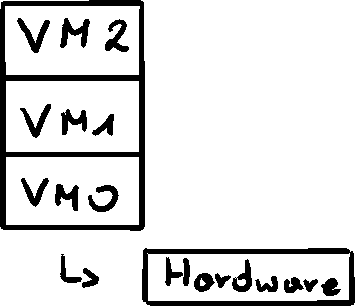
Real computer situation
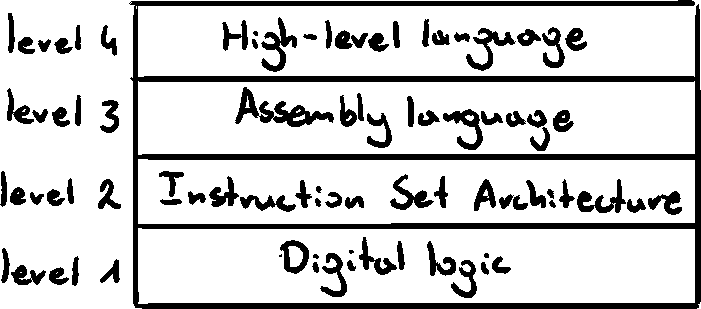
Instruction Set Architecture (level 2) - set of basic operations (add, move, multiply) executed directly by hardware or by microprocessor embedded program - microprogram
Data Representation
Numeric Systems
- binary (base 2)
- octal (base 8)
- decimal (base 10)
- hexadecimal (base 16)
Binary Integers
Sequence of 16 bits, starting from the Most Significant bit (MSb) to the Least Significant bit (LSb)
Binary integers can be signed or unsigned (positive by default)
Bit position values: starting from LSb (
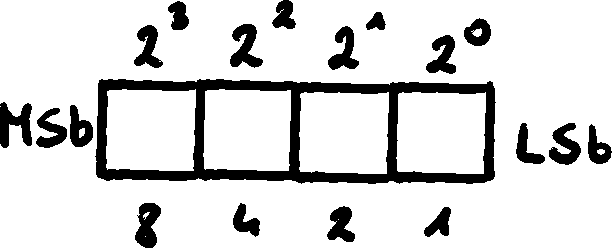
Binary to Decimal Conversion
We multiply value of each bit (
Decimal to Binary Conversion
We divide the decimal by base (2) and save the remainder starting from LSB upwards
Binary Addition
To add two binary numbers, we add bits of the same weight, and (if applicable), carry
Binary Subtraction
bit 0 is easy -
For bit 1, we have to borrow
A simple approach would be to take a Two's Complement of the second value, and turn the problem from
Integer Storage Sizes
Byte - 8 bits
Word - 2 bytes, 16 bits
Double Word - 4 bytes, 32 bits
Quad Word - 8 bytes, 64 bits
Double Quad Word - 16 bytes, 128 bits
Signed Binary Integers
We use MSb as the SIGN bit
0 - positive
1 - negative
Hexadecimal numbers
Easier to read than binary for large numbers
Digits are
One hex digit is equal to 4 bits
Hexadecimal to Decimal Conversion
Same method as for bin-dec. Multiply each digit by its weight (
Decimal to Hexadecimal Conversion
Again, exactly the same process as for dec-bin. Divide by base (
Hexadecimal Addition
Works in the same way as binary, just with base 16
Two's Complement
Most used notation of numbers, allowing for easy addition with negative numbers. Addition is exactly the same as Binary Addition
Additionally, gets rid of negative-zero problem
To get a negative complement of a number, we have to use formula
Hexadecimal Two's Complement
Same process. Taking complement of a hex digit
Signed Binary to Decimal Conversion
If the
If the number is negative (
Minimum and Maximum Values
Signed Byte -
Signed Word -
Signed Double Word -
Signed Quad Word -
Large Data Sizes
1 kilobyte =
1 megabyte =
1 gigabyte =
1 terabyte =
1 petabyte =
1 exabyte =
1 zettabyte =
1 yottabyte =
Terminology for Numeric Data Representation
01000001 as an integer is
To differentiate, we introduce naming:
- Binary digit string - "
" - Decimal digit string - "
" - Hexadecimal digit string - "
" - Octal digit string - "
"
Storing characters
To represent a character, computers use character sets, where each value corresponds to one character
The most basic, 7-bit set is called ASCII (American Standard Code for Information Interchange)
Because ASCII uses only 7 bits, the additional space is used for proprietary sets (i.e. Greek letters on early IBMs)
ANSI (American National Standards Institute) defines 8-bit, 256 character set, with first 128 being letters and symbols on standard US keyboard, next 128 for international letters, currency symbols and fractions
Today, we need to store lots more of characters, and we do it in UNICODE standard.
- UTF-8 - used in HTML, equal values to ASCII
- UTF-16 - balance of efficiency ans storage. MS Windows uses this as base. Character encoded in 16 bits.
- UTF-32 - bit set, where storage isn't a concern
ASCII String
Sequence of 1 or more characters is called a string
String ABC123 is stored as
Most systems require a null-terminated strings ('\0') as an indicator of the end of the string
ASCII Control Characters
Codes
Most common:
- 8 - backspace
- 9 - tab
- 10 - line feed (enter)
- 11 form feed (next page)
- 13 - carriage return
- 27 escape
Binary-Coded Decimal BCD Numbers
Unpacked BCD
One decimal digit is stored in one byte
If the order is equal to decimal (high-order digits first) - Big-Endian Order
If the order is opposite to decimal - Little-Endian Order
Packed BCD
Two digits are stored in one byte
This saves
Boolean expressions
Boolean algebra defies expressions on values TRUE or FALSE
Basic operations:
- NOT -
- AND -
- OR -
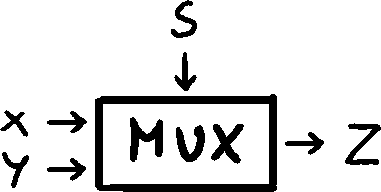
Multiplexer