Chapter 7
This chapter focuses on x86 binary shifts and rotations. Bit manipulation is a important and powerful technique, frequently used in computer graphics, data encryption and hardware manipulation. Those instructions are rarely, or partially implemented in HLL, and usually platform-dependent.
Throughout the chapter, when discussing arithmetic operations, we assume the operands are integers.
HLL do not support arithmetic operations on arbitrary-length integers, whereas x86 assembly allows addition and subtraction of virtually any size.
Shift and Rotate Instructions
Extending the bitwise instructions from chapter 6, shift instructions are used to move bits right and left inside the operand. x86 CPUs instruction sets are particuralrly rich in them, all affecting OF and CF flags
Available shift and rotate instructions
| Mnemonic | Description |
|---|---|
SHL |
Shift left |
SHR |
Shift right |
SAL |
Shift arithmetic left |
SAR |
Shift arithmetic right |
ROL |
Rotate left |
ROR |
Rotate right |
RCL |
Rotate carry left |
RCR |
Rotate carry right |
SHLD |
Double-precision shift left |
SHRD |
Double-precision shift right |
Logical Shifts and Arithmetic Shifts
There are two ways to shift oeprand's bits:
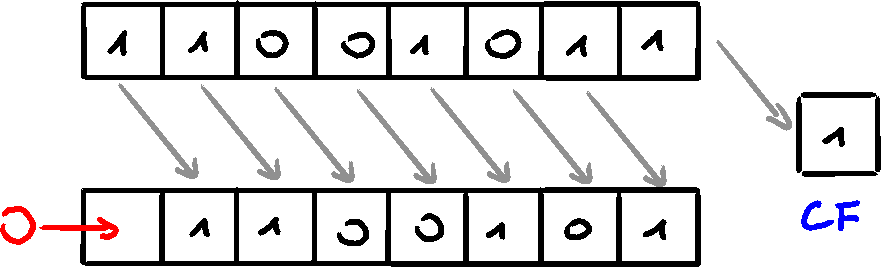
First, logical shift, which moves the bits by a provided number, and fills the 'new/empty' bits with zeros. When shifting right, the LSb is copied into the CF
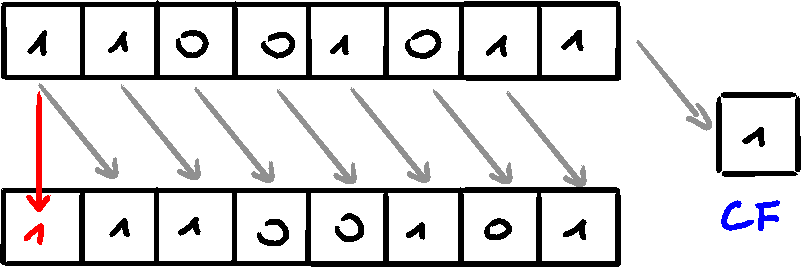
Second type of shift is called arithmetic shift. The 'new/empty' bit is filled with the copy of the shifted bit. Shifting right, the sign bit is copied.
SHL Instruction
The SHL (shift left) instruction performs a logical left shift, filling the lowest bit with 0. The highest bit is moved into the CF, with the previous CF value being discarded.
The instruction format: $$ \text{SHL destination, count} $$
x86 processors allow the count to be imm8 or CL register (values 0-255)
The same format applies to all of the other shifts. (excl. SHRD, SHRL)
mov bl, 8Fh    ; BL = 10001111b
shl bl, 1      ; BL = 00011110b , CF = 1
shl bl, 3      ; BL = 11110000b , CF = 0
Bitwise Multiplication
By shifting bits to the left, the operation is equal to multiplying the number by
For example,
SHR Instruction
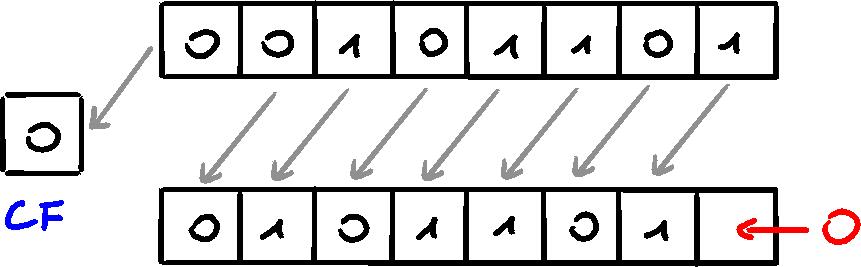
The SHR (shift right) instruction performs a logical right shift, replacing the highest bit with 0. The lowest bit is copied into CF
The usage is exactly the same to SFL
Bitwise Division
Invertly to #Bitwise Multiplication, SHR performs a division of an operand by
For example,
SAL and SAR Instructions
The SAL (shift arithmetic left) instruction performs the same operation as SHL (same opcode). For each shift count, the lowest bit gets filled with 0. The highest bit is moved into CF.
The SAR (shift arithmetic right) instructions shifts the bits to the right, and fills the highest bits with a copy of the MSb (sign bit).
Signed Division
SAR allows for signed division, which preserves the sign bit.
	mov al, 0F0h  ; AL = 11110000b (-16)
	sar al, 2     ; AL = 11111100b (-4)
Sign-Extend AX into EAX
If AX contains a signed integer, to extend its sign into EAX, SHL and SAR can be used
	mov eax, -128   ; EAX = ????FF80h
	shl eax, 16     ; EAX = FF800000h
	sar eax, 16     ; EAX = FFFFFF80h
ROL Instruction
Bitwise rotation occurs when bits are moved like in a circle - bit moved out from one end, gets copied into the other end. There exists another type of rotation, using CF as an intermediate point for shifted bits.
The ROL (rotate left) instruction shifts each bit to the left, copies MSb into CF and LSb.
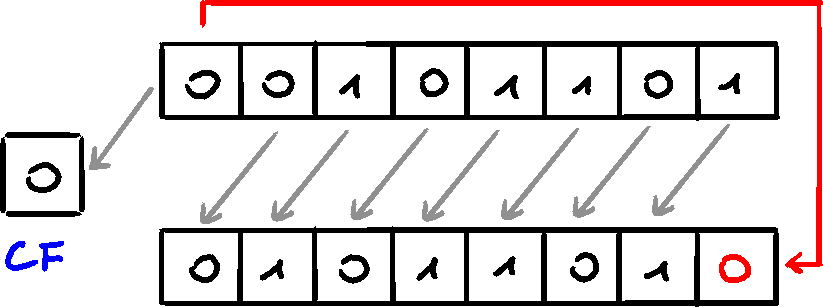
None of the operand's bits are discarded.
Multiple Rotations
When multiple rotations are performed (either by calling ROL multiple times, or by making the rotation count greater than 1) the CF contains the last bit rotated out of the MSb position.
Exchanging Groups of Bits
ROL can be used to exchange the upper and lower halves of an operand
	mov al, 26h   ; AL = 00100110b
	rol al, 4     ; AL = 01100010b = 62h
When rotating a multibyte integer by four bits, it results in rotating each hex digit by one position. When rotating a word 4 times by 4 bytes, the final result will be equal to the original value
	mov ax, 6A4Bh  ;
	rol ax, 4      ; AX = A4B6h
	rol ax, 4      ; AX = 4B6Ah
	rol ax, 4      ; AX = B6A4h
	rol ax, 4      ; AX = 6A4Bh
ROR Instruction
The ROR (rotate right) instruction shifts all bits to the right, and copies LSb into MSb and CF.
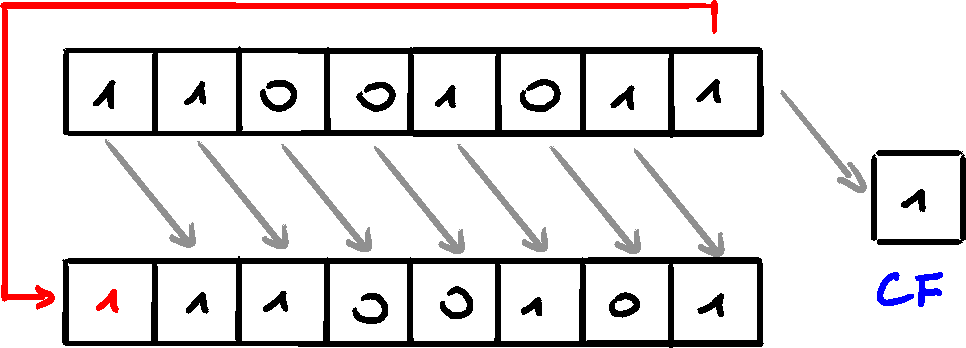
Multiple Rotations
When rotating more than once, the CF contains the last bit moved out of LSb.
RCL and RCR Instructions
RCL Instruction
The RCL (rotate carry left) instruction shifts each bit to the left, copies CF into LSb, and MSb into CF.
CF can be imagined as an extra bit added to the high end of the operand performing a rotate left operation.
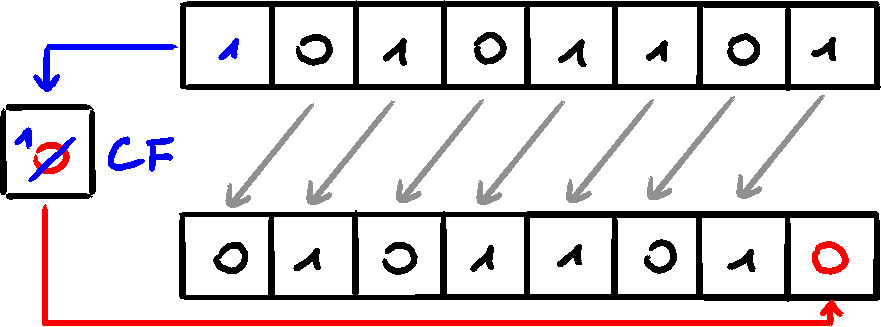
	clc          ; CF = 0
	mov bl, 88h  ; CF = 0, BL = 10001000b
	rcl bl, 1    ; CF = 1, BL = 00010000b
	rcl bl, 1    ; CF = 0, BL = 00100001b
Recover a Bit from the Carry Flag
RCL can be used to recoved a bit that was previously shifted into CF. The code below tests the lowest bit of testval by shifting it into the CF. If bit is set, jump is taken, if 0 - RCL restores the original value
.data
	testVal BYTE 01101010b
.code
	shr testVal, 1   ; shift LSB into CF
	jc exit          ; jump if CF set
	rcl testVal, 1   ; else restore the testVal
RCR Instruction
The RCR (rotate carry right) instruction shifts each bit to the right, copies CF into MSb, and copies LSb into CF.
Similar to RCL, visualizing the rotation as using CF as another bit is the easiest to understand
Signed Overflow
Signed overflow occurrs when result of signed operation generates a result that exceeds the capacity of the destination. OF is set if shifting/rotating a signed integer by one position generates a value outside the signed integer range of the destination operand (number is reversed). In the following, positive
	mov al, +127    ; AL = 01111111b
	rol al, 1       ; AL = 11111110b, OF = 1
Similarly, when shifting
	mov al, -128
	shr al, 1
The OF value is undefined if the shift/rotation count is greated than 1
SHLD/SHRD Instructions
The SHLD (shift left double) instruction shifts a destination operand by a number of given bits. The new/empty bits are filled by the MSbs of the source operand.
Source operand is not affected. SF, ZF, AF, PF, and CF are affected
Format:
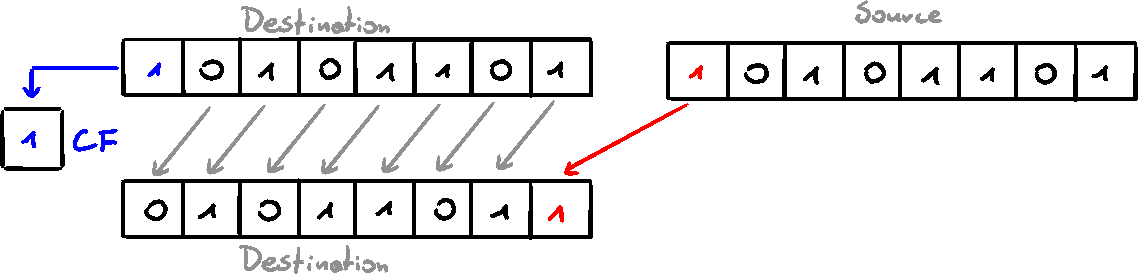
The SHRD (shift right double) instruction shifts the destination operand by a given number of bits, and fills the opened bits with the LSbs of the source operand.
For both SHLD and SHRD, the destination oeprand must be register or memory, and source must be a register. The count can be CL or imm8
Shift and Rotation Applications
There are specific situations where bitwise shifts and rotations are needed, and assembly is a good tool for that. This part will focus on example applications
Shifting Multiple Doublewords
By dividing an extended-precision integer into array of bytes, words, or doublewords, we can shift it. Array elements are stored typically in little-endian order/array, where low-order byte is placed at the array's starting address. Then, working up from the bytes to the high-order byte, next bytes are stored. Instead of storing the array in bytes, it can be stored in words/doublewords, but that will not affect the memory placement, as words/doublewords are also saved nin the little-endian order.
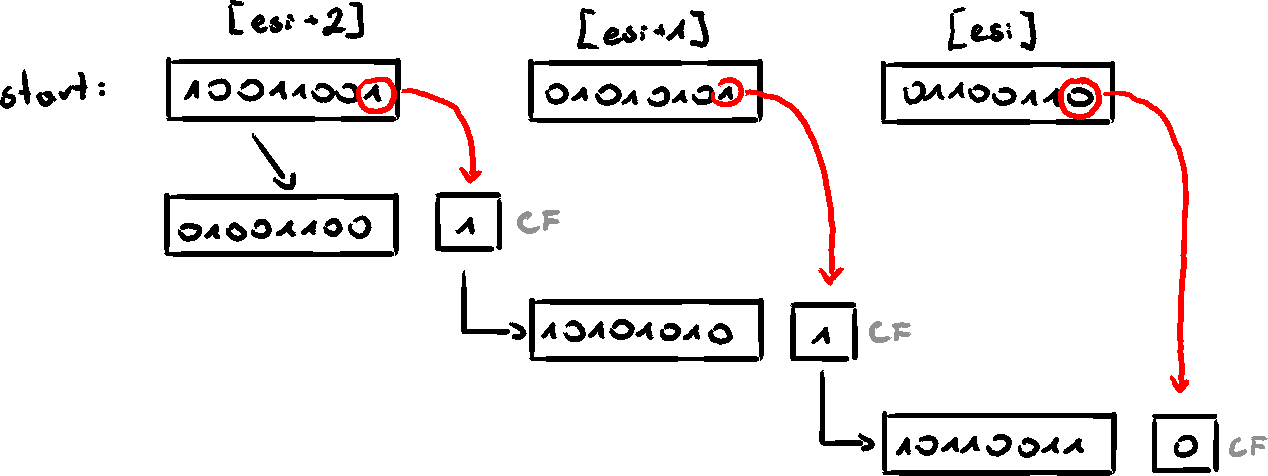
To shift an array of bytes 1 bit to the right:
- shift the highest byte at
[esi+1]to the right, automatically copying its lowest bit into CF - Rotate value at
[esi+1]to the right, filling the highest bit with the value of the CF and shifting the LSb into the CF - Repeat he same for value at
[esi]
.data
	ArraySize = 3
	array BYTE ArraySize DUP(99h)   ; 1001b pattern in each nybble
.code
main PROC
	mov esi, 0
	shr array[esi+2], 1  ; high byte
	rcr array[esi+1], 1  ; middle byte, use CF from the previous shift
	rcr array[esi], 1    ; low byte, use CF from the previous rotation
Multiplication by Shifting Bits
To squeeze every performance advantage from integer multiplication, we can use bit shifting instead of MUL instruction. The SHL instruction performs unsigned multiplication when the multiplier is a power of 2. Below is an example of unsigned multiplication.
This technique uses the fact that any number can be represented as the sum of powers of two
The following shows multiplication
Which can be turned into following code:
	mov eax, 123
	mov ebx, eax
	shl eax, 5
	shl ebx, 2
	add eax, ebx
Displaying Binary Bits
Converting a binary integer into ASCII binary string, allowing for display is a common task. The SHL instruction is useful for that, as it copies the MSb of an operand into CF during every shift left. Following is the simple implementation
; Converts 32-bit binary integer into binary
; Receives: EAX = binary integer, ESI = buffer pointer
; Returns: buffer filled with ASCII binary digits
BinToAsc PROC
	push ecx
	push esi
	mov ecx, 32                 ; number of bits in EAX
L1:
	shl eax, 1                  ; shift MSb into CF
	mov BYTE PTR [esi], '0'     ; choose 0 as default digit
	jnc L2                      ; if CF not set, repeat loop
	mov BYTE PTR [esi], '1'     ; if CF set, move 1 into buffer
L2:
	inc esi                     ; next buffer position
	loop L1                     ; loop

	pop esi
	pop ecx
	ret
BinToAsc ENDP
Multiplication and Division Instrustions
Unsigned Integer Multiplication (MUL)
In 32-bit mode, MUL has three formats: multiplying 8-bit operand by AL, 16-bit operand by AX, or 32-bit operand by EAX.
The multiplier and multiplicand must always be the same size, and the product is twice their size
The single operand is the multiplier.
Because the destination operand is twice the size, overflow cannot occur
CF and OF are set if upper half of product is not equal zero
When AX is multiplied by 16-bit, the product is stored in DX:AX (high 16 bits are in DX, low 16 bits are in AX)
CF is set if DX is not equal to zero, which informs that products doesn't fit into implied destination (AX)
| Multiplicand | Multiplier | Product |
|---|---|---|
| AL | reg/mem8 | AX |
| AX | reg/mem16 | DX:AX |
| EAX | reg/mem32 | EDX:EAX |
In 64-bit mode, the 64-bit operands are available, allowing for 128-bit product stored in RDX:RAX
Examples
CF is not set because the AH is equal zero
	mov al, 5h
	mov bl, 10h
	mul bl      ; AX = 0050h, CF=0
CF is set because the upper half (DX) is not equal zero
.data
	val1 WORD 2000h
	val2 WORD 0100h
.code
	mov ax, val1  ; AX = 2000h
	mul val2      ; DX:AX = 00200000h, CF = 1
			      ; DX = 0020  AX = 0000h
Signed Integer Multiplication (IMUL)
The signed multiply IMUL instruction performs the signed multiplication performing the sign of the product. This is done by sign extending the highest bit of the lower half of the product into the opper bits of the products. The x86 instruction supports three formats: one, two, and three operands
Using IMUL in 64-bit mode is exactly the same, with the additional RDX:RAX result available
Single-Operand Formats
The one-operand store the product in AX, DX:AX, or EDX:EAX
Both operands must be the same size
Similar to MUL, the storage size makes overflow impossible
CF and OF behave the same - set if upper half is not zero
Example
	mov al, -4
	mov bl, 4
	imul bl    ; AX = FFF0h, OF = 0
OF is clear, because AH is the sign-extension of AL
Two-Operand Formats (32-bit Mode)
The result is stored in the first operand, which must be a register
The second operand (multiplier) can be a register, memory, or immediate
Two-operand formats truncate the product to the length of destination. If significant digits are lost, OF and CF are set
Always check their value after multiplication!
Three-Operand Format
Three-operand format stores product in first operand, which is a result of multiplying the second by the third operand
Unsigned Integer Division (DIV)
There are three formats:
| Dividend | Divisor | Quotient | Remainder |
|---|---|---|---|
| AX | reg/mem8 | AL | AH |
| DX:AX | reg/mem16 | AX | DX |
| EDX:EAX | reg/mem32 | EAX | EDX |
In 64-bit mode, DIV uses RDX:RAX as divident and permits the divisor to be 64-bit register or memory.
Example
	mov ax, 0083h  ; dividend
	mov bl, 2      ; divisor
	div bl         ; AL = 41h, AH = 01h
Signed Integer Division (IDIV)
The signed division is nearly identical to the unsigned one, with one important difference: dividend must be sign-extended before the division takes place.
Example why:
.data
	wordVal SWORD -101  ; FF98h
.code
	mov dx, 0
	mov ax, wordVal     ; DX:AX = 0000FF98h
	mov bx, 2
	idiv bx
After moving the wordVal into AX, the DX:AX doesn't hold corrent -101, but +65435. To fix that, CWD (convert word to doubleword) must be used to sign-extend AX into DX:AX
.data
	wordVal SWORD -101  ; FF98h
.code
	mov dx, 0
	mov ax, wordVal     ; DX:AX = 0000FF98h
	cwd                 ; DX:AX = FFFFFF98h (-101)
	mov bx, 2
	idiv bx             ; AX = FFCEh(-50)
Sign Extension Instructions
There are three sign extension instructions in the Intel architecture:
CBW- convert by to wordCWD- convert word to doublewordCDQ- convert doubleword to quadword
CBW sign-extends AL to AX
CWD sign-extends AX to DX:AX
CDQ sign-extends EAX to EDX:EAX
IDIV Instruction
IDIV (signed divide) performs signed integer division using the same operands as #Unsigned Integer Division (DIV)
Before the execution, the divident must be sign-extended
The remainded always has the same sign as the dividend
Divide Overflow
When operation produces a quotient that will not fit into the destination operand, a divide overflow occurs. This causes processor exception and halts the program. The following code will generate such error:
	mov ax, 1000h
	mov bl, 10h
	div bl       ; AL cannot hold 100h
A similar error will appear when dividing by zero
Extended Addition and Subtraction
Extended precision addition and subtraction is a technique of adding and subtracting numbers having an almost unlimited size. In C++ there is no way of adding 1024-bit integers, but in assembly using ADC (add with carry) and SBB(subtract with borrow), we can do that
ADC Instruction
The ADC (add with carry) adds both source and CF to a destination
The instruction formats are the same as for ADD instruction, and operands must be the same size
Extended Addition Example
Example below adds two extended integers of the same size. It loops through the integers as if they were parallel arrays.
The procedure receives two pointer in ESI and EDI that point to the integers to be added. EBX points to the result buffer, with the precondition that the buffer must be one byte longer than two integers. The length of the longest integer is passed in ECX. The numbers must be stored in little-endian order, with the lowest order byte at each array's starting offset.
Extended_Add PROC
	pushad
	clc                   ; clear carry flag

L1: mov al, [esi]         ; get first integer
	adc al, [edi]         ; add second integer
	pushfd                ; save carry flag
	mov [ebx], al         ; store partial sum
	inc esi               ; advance all three pointers
	inc edi
	inc ebx
	popfd                 ; restore carry flag
	loop L1               ; repeat loop

	mov BYTE PTR [ebx], 0 ; clear high byte
	adc BYTE PTR [ebx], 0 ; add any leftover carry
	popad
	ret
The flags are pushed onto the stack in line 7 and restored in line 12, because ADD instructions on 9-11 might set/unset the CF
LOOPnever modifies CPU status flags
SBB Instruction
The SBB (subtract with borrow) instruction subtracts both source and CF from the destination operand. The formats are the same as for ADC
The following code performs a 64-bit subtraction using 32-bit operands
	mov edx, 7
	mov eax, 1    ; EDX:EAX = 0000000700000001h
	sub eax, 2    ; EDX:EAX = 00000007FFFFFFFFh, CF = 1
	sbb edx, 0    ; EDX:EAX = 00000006FFFFFFFFh
ASCII and Unpacked Decimal Arithmetic
The CPU calculates in binary, but is also able to perform arithmetic on ASCII decimal strings
For the below UI input:
Enter first number:  3402
Enter second number: 1256
The sum is:          4658
There are two ways of calculating the sum:
- Convert both inputs to binary, add binary values, convert sum from binary to ASCII digit string
- Add digit strings directly, by adding each pair of ASCII digits (3+1, 4+2, 0+5, 2+6). The sum is already an ASCII digit string so can be displayed on the screen
The second option uses specialized instructions that adjust the sum after adding each pair of ASCII digits
| Instruction | Comment |
|---|---|
AAA |
ASCII adjust after addition |
AAS |
ASCII adjust after subtraction |
AAM |
ASCII adjust after multiplication |
AAD |
ASCII adjust before division |
ASCII Decimal and Unpacked Decimal
The high 4 bits of an unpacked decimal integer are always zeros, whereas the same bits in ASCII decimal number are equal to 0011b. In both cases, both types of integers store one digit per byte. The following shows how 3402 would be stored
ASCII arithmetic executes slower than binary arithmetic, but has two advantages:
- No need to convert from string to binary before calculations
- Decimal point permits operations on real numbers without danger of roundoff errors in floating-point numbers
ASCII addition and subtraction works on both ASCII format and unpacked decimal format, but multiplication and division works only on unpacked decimal format.
AAA Instruction
The AAA (ASCII adjust after addition) adjust the binary result of ADD or ADC instruction. If AL contains binary value procudes by adding two ASCII digits, AAA converts AL to two unpacked decimal digits and stores them in AH and AL in unpacked format. After that, AH and AL can be easily converted to ASCII by OR with 30h
	xor ax, ax
	mov al, '8'   ; AX = 0038h
	add al, '0'   ; AX = 006Ah
	aaa           ; AX = 0100h
	or ax, 3030h  ; AX = 3130h = '10'
AAS Instruction
In 32-bit mode, the AAS (ASCII adjust after subtraction) follows a SUb or SBB instruction that has subtracted one unpacked decimal value from another and stored the result in AL. It makes result in AL consistent with ASCII digit representation. Adjustment is only necessary if the result of subtraction is negative
	xor ax, ax
	mov al, '8'    ; AX = 0038h
	sub al, '9'    ; AX = 00FFh
	aas            ; AX = FF09h
	pushf          ; save the CF
	or al, 30h     ; AX = FF39h
	popf           ; restore CF
AAM Instruction
AAM instruction (ASCII adjust after multiplication) converts binary product of MUL to an unpaced decimal. The multiplication can only use unpacked decimals (5 == 05h, not 35h)
	mov bl, 05h
	mov al, 06h
	mul bl       ; AX = 001Eh
	aam          ; AX = 0300h
AAD Instruction
AAD instruction (ASCII adjust before division) converts unpacked decimal divident in AX to binary representation in preparation for executing DIV instruction.
	mov ax, 0307h    ; dividend UD '37'
	aad              ; AX = 0025h
	mov bl, 5        ; divisor
	div bl           ; AX = 0207h
Packed Decimal Arithmetic
Packed Binary-Coded Decimal Integers (BCD Integers) store two decimal digits per byte. For simplification, only unsigned BCD will be used. The numbers are stored in little-endian order, with each digit represented by 4 bits.
	bcd1 QWORD 2345673928737285h ; 2,345,673,928,737,285 decimal
	bcd2 DWORD 12345678h         ; 12,345,678 decimal
	bcd3 DWORD 08723654h         ; 8,723,654 decimal
	bcd4 WORD 9345h              ; 9,345 decimal
	bcd5 WORD 0237h              ; 237 decimal
	bcd6 BYTE 34h                ; 34 decimal
There are two main benefits from this:
- Almost any number of significant digits are possible
- Conversion of BCD to ASCII is relatively simple
DAA (decimal adjust after addition) and DAS (decimal adjust after subtraction) are two instructions used to adjust the result of operation on packed decimals. No instructions exist for multiplication and division. In those cases, numbers must be unpacked, multiplied or divided, and repacked
DAA Instruction
DAA (decimal adjust after addition) instruction converts a binary sum from ADD or ADC in AL to packed decimal format.
	mov al, 35h
	add al, 48h    ; AL = 7Dh
	daa            ; AL = 83h = '83'
DAS Instruction
DAS (decimal adjust after subtraction) converts result of subtraction by SUB or SBB instruction to in AL into BCD format
	mov bl, 48h
	mov al, 85h
	sub al, bl    ; AL = 3Dh
	das           ; AL = 37h = '37'