Chapter 8
Advanced Procedures
Stack Frames
Stack Parameters
Subroutines can receive parameters on the stack
In 32-bit mode, stack parameters are always used by Windows API functions
In 64-bit mode, they receive a combination or register and stack parameters
Stack frame or activation record is an area on the stack for passed arguments, subroutine return address, local variables, and saved registers. Stack fram is created by the following sequential steps:
- Passed arguments (if exist) are pushed on the stack
- Subroutine is called, with subroutine return address pushed onto the stack
- With subroutine execution, EBP is pushed on the stacl
- EBP is equal to ESP. From this point, EBP is base reference for all subroutine parameters
- If local variables exist, ESP is decremented to reserve space for the variables on the stack
- If any registers need to be saved, they are pushed on the stack
The stack structure is directly affected by a program's memory model and its choice of argument passing convention
Disadvantages of Register Parameters
For a long time, Microsoft parameter passing convention in 32-bit programs was fastcall. It has a runtime efficiency by placing parameters in registers before calling a subroutine. The alternative - pushing parameters onto the stack - is much slower. The registers used for parameters typically are EAX, EBX, ECX, and EDX, sometimes EDI and ESI. The same registers are also used for loop counters and calculation operands, which requires pushing them onto the stack before procedure calls, assigning procedure argument values, and later restoring them to original values
This adds a big number of extra pushes and pops cluttering the code and eliminates performance advantage from using register parameters.
This also allows for easy creation of hard to spot bugs, where the push/pop are misaligned, or they operate on the wrong values
Stack parameters offer a flexible approach without the need for register parameters. Just before a subroutine call, the arguments are pushed onto the stack.
Two types of arguments pushed on the stack during subroutine calls
- Value arguments (values of variables and constants)
- Reference arguments (addresses of variables)
Passing by Value
When argument is passed by value, a copy of the value is pushed on the stack
.data
	val1 DWORD 5
	val2 DWORD 6
.code
	push val2
	push val1
	call AddTwo
equivalent to the C++ function call
AddTwo(val1, val2);
Note that arguments are pushed in reverse order - C/C++ convention
Passing by Reference
Passing argument by reference means passing its address (offset) of that object
	push OFFSET val2
	push OFFSET val1
	call Swap
equivalent to the C++ function call
Swap(&val1, &val2);
Passing Arrays
HHL languages always pass arrays to subroutines as reference. They push the address of the array on the stack. The subroutine can then get the arress from the stack and use it to access the array. Pushing an array by value would mean copying the entire array contents onto the the stack which would be both time and memory consuming
.data
	array DWORD 50 DUP(?)
.code
	push OFFSET array
	call ArrayFill
Accessing Stack Parameters
HLL languages use many ways to initialize and access parameters during function calls.
The C/C++ convention defines a prologue consisting of statements that save the EBP register and point it to the top of the stack. They may push certain registers on the stack whose values will be restored when the function returns
The end of function consists of an epilogue in which EBP is restored and RET returns to the caller
AddTwo Example
The following AddTwo function in C receives two integers passed by value and returns their sum
int AddTwo(int x, int y)
{
	return x + y;
}
Below is the equivalent implementation in assembly langauge
In its prologue, it pushes EBP onto the stack to preserve its existing value
AddTwo PROC
	push ebp
next, EBP is set to the same value as ESP, so EBP can be the base pointer for AddTwo stack frame
mov ebp, esp
After the two instructions, the below image shows the contents of the stack frame
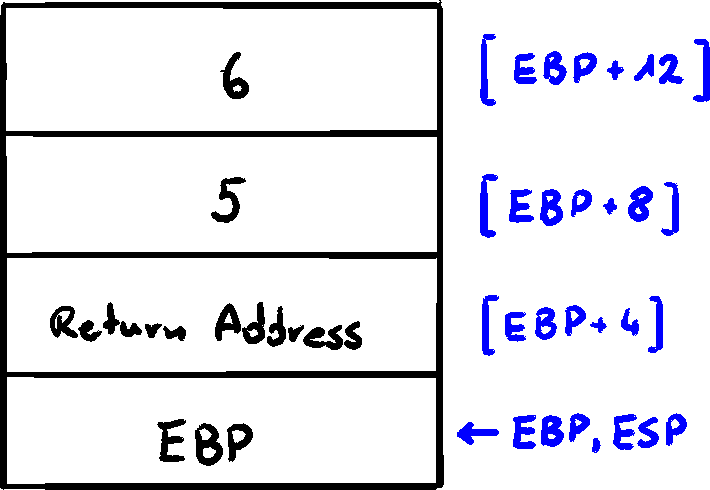
If AddTwo pushes any additional registers on stack, the EBP offset to stack parameters does not change
Base-Offset Addressing
To access stack parameters, base-offset addressing will be used. EBP is the base register and offset is a constant. The 32-bit subroutine return values are usually in EAX. The following is the C/C++ convention adherent implementation of AddTwo
AddTwo PROC
	push ebp
	mov ebp, esp
	mov eax, [ebp + 12]
	add exb, [ebp + 8]
	pop ebp
	ret
AddTwo ENDP
Explicit Stack Parameters
Referencing stack parameters with expressions like
y_param EQU [ebp + 12]
x_param EQU [ebp + 8]
...
	mov eax, y_param
	add eax, x_param
...
Cleaning up the stack
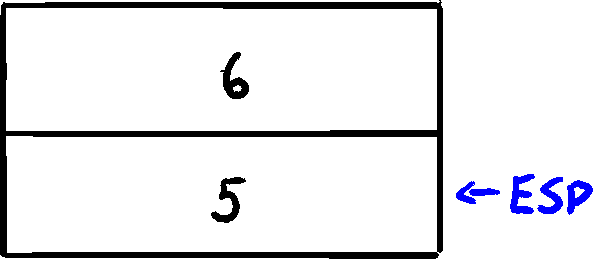
There must be a way for parameters to be removed from stack when a subroutine returns. Otherwise, a memory leak happens and stack becomes corrupted. For the below code
	push 6
	push 5
	call AddTwo
if the AddTwo leaves parameters on the stack, after returning from the call the situation is following
32-Bit Calling Conventions
A calling convention is a standardized order for passing arguments and clearing the stack when calling and returning from subroutines
The C calling convention was established by C language, used to create both Unix and Windows
The STDCALL calling convention describes a protocol for calling Windows API functions
The C Calling Convention
Used by C and C++ programming languages
Subroutine parameters are pushed on the stack in reverse order
This convention solves problem of cleaning up the stack in a simple way. When a program calls a subroutine, it follows the call instruction with a statement that adds a value to the stack pointer (ESP) equal to the combines sizes of the subroutine parameters. Below is an example of subroutine with two parameters
Example1 PROC
	push 6
	push 5
	call AddTwo
	add esp, 8
	ret
Example1 ENDP
In working, this returns the stack pointer back to the place before pushing the arguments onto the stack. The values are still there, but the stack pointer is before them so they are not used and will get overriden.
The STDCALL Calling Convention
Used by Windows API calls
Pushes arguments in reverse order
In the subroutine epilogue, an integer is supplied to the RET instruction, which adds the given value to ESP after returning. This integer must be equal to bytes of stack space consumed by the procedure's parameters
AddTwo PROC
	push ebp
	mov ebp, esp         ; base of stack frame
	mov eax, [ebp + 12]  ; second parameter
	add eax, [ebp + 8]   ; first parameter
	pop ebp
	ret 8                ; cleanup the stack
AddTwo ENDP
Having a parameter in the RET instruction reduces amount of code by one instruction and ensures that calling programs never forget to cleanup the stack.
Differences between C and STDCALL
C calling convention permits subroutines to declare a variable number of parameters. The caller can decide how many arguments it will pass. An example is {c}printf() function where number of arguments depends on number of format specifiers
printf("Printing values: %d, %f, %c", x, y, z);
C compiler pushes arguments on the stack in reverse order. Called function must determine the number of arguments passed, and access them one by one. There is no convenient way of encoding a constant in the RET instruction to clean up the stack, so the responsibility is left to the caller
The Irvine32 library uses STDCALL when calling 32-bit Windows API functions. Irvine64 uses x64 calling convention.
Saving and Restoring Registers
A good and common practice is to save registers on the stack before modifying them in subroutines. Ideally, they should be pushed just after setting EBP to ESP, and just after reserving space for local variables. This helps to avoid changing offsets of existing stack parameters
MySub PROC
	push ebp           ; save base pointer
	mov ebp, esp       ; base of stack fram
	push ecx           ; save registers that will get modified
	push edx
	mov eax, [ebp + 8] ; get stack parameter
	...
	pop edx            ; restore saved registers
	pop ecx
	pop ebp            ; restore base pointer
	ret                ; clean up stack
MySub ENDP
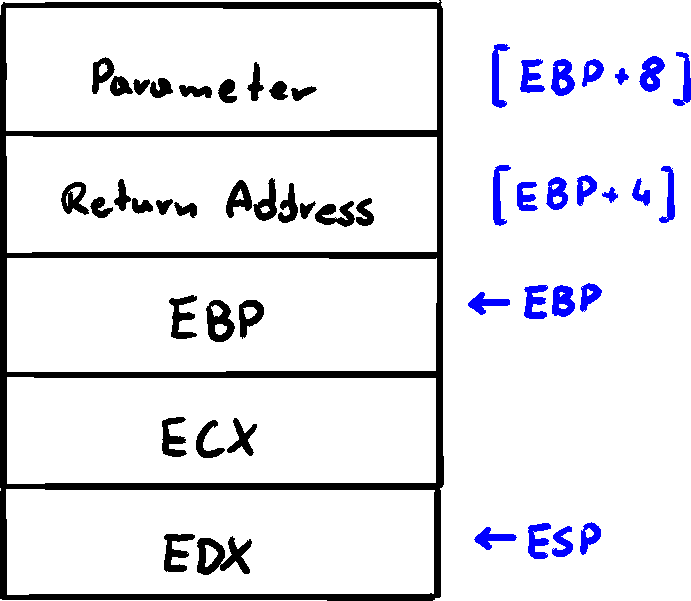
After subroutine initialization, EBP's value remain fixed through the procedure. Pushing ECX and EDX doesn't affect the displacement of parameters from EBP, because the stack grows below EBP
Local Variabels
In HLL, variables created, used, and destroyed within a single subroutine are called local variables. They are created on the stack, usually below EBP. They cannot be assigned default values at assembly time, but they can be initialized at runtime. We can create local variables in assembly the same way as in C/C++
void mySub()
{
	int x = 10;
	int y = 20;
}
Looking at the compiled machine code, it can be seen that each stack entry for local variable defaults to 32 bits, so each variable storage size is rounded upward to a multiple of 4. A total of 8 bytes is reserved for the two local variables. The code would look like this in assembly:
MySub PROC
	push ebp
	mov ebp, esp
	sub esp, 8                   ; create locals
	mov DWORD PTR [ebp - 4], 10  ; X
	mov DWORD PTR [ebp - 8], 20  ; Y
	mov esp, ebp                 ; remove locals from stack
	pop ebp
	ret
MySub ENDP
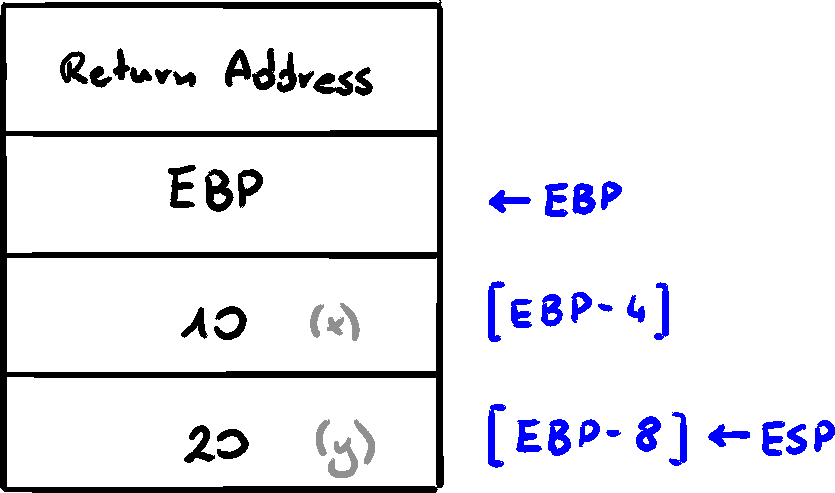
After local variables are initialized, the stack frame looks like this
Before the functions finished, it resets the stack pointer by assigning it to the value of EBP
mov esp, ebp
It releases the local variables from the stack
If that step would be omitted, the pop EBP instruction would set EBP to 20 and RET instruction would branch to memory location 0x0A (10) causing the program to stop
Local Variable Symbols
To make the programs easier to read, one can define a symbol for each local variable's offset and use the symbol in the cude
X_local EQU DWORD PTR [ebp - 4]
Y_local EQU DWORD PTR [ebp - 8]
...
	mov X_local, 10
	mov Y_local, 20
...
Reference Parameters
Reference parameters are accessed by procedures using base-offset addressing (from EBP). Because each parameter is a pointer, it is usually loaded into a register for use an an indirect operand
Support that a pointer to an array is located at stack address
ArrayFill Example
To fill an array with pseudorandom sequence of 16-bit integers, we can pass the array as the pointer and the array length to a procedure
.data
	count = 100
	array WORD count DUP(?)
.code
	push OFFSET array
	push count
	call ArrayFill
The ArrayFill now has offset of the array at
ArrayFill PROC
	push ebp
	mov ebp, esp
	pushad               ; save registers
	mov esi, [ebp + 12]  ; array offset
	mov ecx, [ebp + 8]   ; array length
	cmp ecx, 0
	je L2
L1: mov eax, 10000h      ; get random between 0 - FFFFh
	call RandomRange
	mov [esi], ax        ; insert value in array (esi has the pointer)
	add esi, TYPE WORD   ; move to next element
	loop L1
L2: popad                ; restore registers
	pop ebp
	ret 8                ; clean up the stack
ArrayFill ENDP
LEA Instruction
The LEA (Load Effective Address) instruction returns address of an indirect operand. Indirect operands contain one or more registers, so their offsets are calculated at runtime. For the following C++ code
void makeArray()
{
	char myString[30];
	for (int i {0}; i < 30; i++)
		myString[i] = '*';
}
The equivalent assembly code allocates space for myString on stack and assigns the address to ESI - indirect operand. Despite array being 30 bytes, ESP is decremented by 32 to keep it aligned on a doubleword boundary
makeArray PROC
	push ebp
	mov ebp, esp
	sub esp, 32              ; myString address is at EBP - 30
	lea esi, [ebp - 30]      ; load address of myString
	mov ecx, 30              ; loop counter
L1: mov BYTE PTR [esi], '*'  ; fill position
	inc esi                  ; move to next
	loop L1
	add esp, 32              ; remove the array (restore ESP)
	pop ebp
	ret
makeArray ENDP
It is impossible to use OFFSET to get adderss of a stack parameter, because OFFSET works only with addresses known at compile time. The following would not assemble
mov esi, OFFSET [ebp - 30]
ENTER and LEAVE Instructions
ENTER Instruction
The ENTER instruction automatically creates a stack frame for a called procedure by reserving space for local variables and saving EBP on the stack. Actions performed:
- Pushes EBP on the stack
push ebp - Sets EBP to the base of stack frame
mov ebp, esp - Reserves space for local variables
sub esp, numbytes
It has two operands - constant specifycing bytes of stack space to reserve for local variables, and lexical nesting level of the procedure
Both operands are immediate values. numbytes is always rounded up to 4 to keep ESP on doubleword boundary. nestingLevel determines the number of stack frame pointers copied into the current stack from from the calle stack frame. In programs of this course, nestingLevel is always zero
Examples
Example 1
Following declares procedure with no local variables
MySub PROC
	enter 0, 0
==== equivalent to ====
MySub PROC
	push ebp
	mov ebp, esp
Example 2
ENTER reserves 8 bytes of stack space for local variables
MySub PROC
	enter 8, 0
==== equivalent to ====
MySub PROC
	push ebp
	mov ebp, esp
	sub esp, 8
LEAVE Instruction
The LEAVE instruction terminates stack frame from procedure, reversing action of a previous ENTER instruction by restoring ESP and EBP to values before procedure call.
MySub PROC
	enter 8, 0
	...
	leave
	ret
MySub ENDP
allocates and later discards 8 bytes of space for local variables
MySub PROC
	push ebp
	mov ebp, esp
	sub esp, 8
	...
	mov esp, ebp
	pop ebp
	ret
MySub ENDP
LOCAL Directive
LOCAL was created by Microsoft as high-level substitute for ENTER instruction. LOCAL declares one or more local variables by name, assigning them size attributes (ENTER only reserves an unnamed block of space).
If used, LOCAL must be immediately after PROC directive
where varlist is a list of variable definitions, separater by commas. Can span multiple lines. Each variable has following form:
The label may be any valid identifier, and type can either by a standard type (WORD, DWORD, ...) or a user-defined type
The below Merge Procedure creates a PTR WORD local variable pArray containing a pointer to 16-bit integer, and SwapFlag variable of type BYTE
MergeProc
	LOCAL pArray: PTR WORD, SwapFlag:BYTE
MASM Code Generation
The following code declares one doubleword local variable
Example1 PROC
	LOCAL temp:DWORD
	mov eax, temp
	ret
Example1
This code is then translated by MASM and the following is generated
	push ebp
	mov ebp, esp
	add esp, 0FFFFFFFCh    ; add -4 to ESP
	mov eax, [ebp - 4]
	leave
	ret
Microsoft x64 Calling Convention
Microsoft calling convention is a scheme for passing parameters in subroutines in 64-bit programs. This convention is used by C and C++ compilers, as well as Windows API library. The characteristics:
CALLinstruction subtracts 8 from RSP (stack pointer)- First four parameters passed to subroutine are placed in RCX, RDX, R8, and R9 registers, in that order. Additional parameters are pushed on the stack, left-to-right
- Parameters less than 64-bit long are not zero-extended, so the upper bites have inderterminate values
- If the return value is an integer whose size is
bits, it must be returned in RAX - It is caller's responsibility to allocate at least 32 bytes of shadow space on stack, so called subroutines can optionally save the register parameters in this area
- When creating a subroutine, the stack pointer (RSP) must be aligned to 16-byte boundary.
CALLinstruction pushes a 8-byte return address to stack, so calling program must subtract 8 from RSP, in addition to the 32 it subtracts for the register parameters - Removal of all parameters and shadow space at the subroutine finish is caller's responsibility
- Return value larger than 64 bits are placed on the stack, and RCX points to that location
- RAX, RCX, RDX, R8, R9, R10, and R11 registers are ofter altered by subroutines,so if the calling program wants them preserved, it will push them on the stack before the subroutine call and pop them after
- The values of RBX, RBP, RDI, RSI, R12, R13, R14, and R15 must be preserved by subroutines
Recursion
A recursive subroutine is one that calls itself, either directly or indirectly
Recursion - practice of calling recursive subroutines - can be a powerful tool when working with data structures that have repeating patterns. Examples are linked lists and graphs where a program must retrace its path
Endless Recursion
The most obvious type of recursion is when a subroutine calls itself endlessly
.data
	endlessStr BYTE "Hello", 0
.code
Endless PROC
	mov edx, OFFSET endlessStr
	call WriteString
	call Endless
	ret
Endless ENDP
This doesn't have any practical use. Each time the procedure calls itself, it uses up 4 bytes of stack space when CALL instruction pushes the return address.
Recursively Calculating a Sum
Useful recursive subroutines always contain a terminating condition. When it becomes true, the stack unwinds when program executes all pending RET instructions
An example can be calculating sum of
CalcSum PROC
	cmp ecx, 0     ; if current n = 0, return
	jz L2
	add eax, ecx
	dec ecx
	call CalcSum
L2: ret
CalcSum ENDP
Even a simple recursive procedure uses a large amount of memory on the stack. At the very minimum, 4 bytes of stack space are used for every recursive call
Calculating a Factorial
Recursive subroutines often store temporary data in stack parameters. When the recursive calls unwind, the data saved on the stack can be useful. The typical recursive C/C++ function to calculate factorial
int factorial(int n)
{
	if (n == 0)
		return 1;
	else
		return n * factorial(n - 1);
}
Given any number n, we assume we can calculate the factorial of
The following calculates factorial in assembly. It gets the initial value on the stack, and returns value in EAX
Factorial PROC
	push ebp
	mov ebp, esp
	mov eax, [ebp + 8]    ; get n
	cmp eax, 0            ; n > 0
	ja L1                 : yes - continue
	mov eax, 1            : no - EAX = 1
	jmp L2                ;      and return to caller

L1: dec eax
	push eax              ; push n - 1 onto stack
	call Factorial        ; call Factorial(n-1)
	; below executes upon returning from the recursive call
ReturnFact:
	mov ebx, [ebp + 8]    ; get n (pushed by last recursive)
	mul ebx               ; EDX:EAX = EAX * EBX
						  ; (EAX has value form last recursive)
L2: pop ebp               ; return EAX
	ret 4                 ; clean up stack
Factorial ENDP
At the last Factorial call, the stack looks like this:
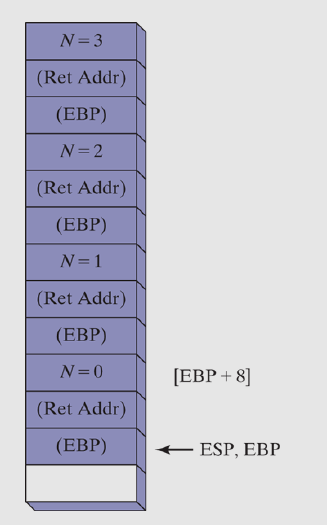
When
After the first return call
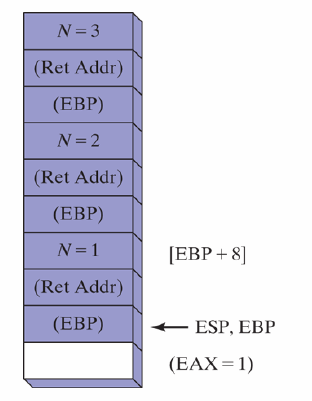
After third
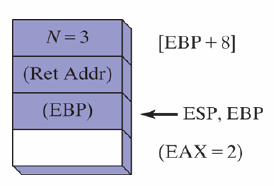
The final value of EAX is 6, as the previous value is multiplied by the value on stack
INVOKE, ADDR, PROC, and PROTO
In 32-bit mode, INVOKE, ADDR, PROC, and PROTO directive are powerful tools for defining and calling procedures
ADDR is an essential tool for defining procedure parameters
These directives mask underlying structure of the stack which might be controversial, but may also lead to better programming - PROTO helps the assembler to validate procedure calls by checking argument lists against procedure declarations
INVOKE Directive
Available only in 32-bit mode, INVOKE pushes arguments onto the stack (in the order specified by .model) and calls the procedure. INVOKE replaces CALL allowing to pass multiple arguments using a single line of code. The syntax:
argumentList is an optional comma-delimited list of arguments passed to the procedure
Using the CALL instruction, to pass multiple instructions:
	push TYPE array
	push LENGTHOF array
	push OFFSET array
	call DumpArray
which can be reduced to a single line (arguments are listed in reverse order assuming STDCALL)
INVOKE DumpArray,
	OFFSET array,
	LENGTHOF array,
	TYPE array
INVOKE permits almost any number of arguments, and individual arguments can appear on separate source code lines
INVOKE DumpArray,
OFFSET array,
LENGTHOF array,
TYPE array
Argument Types Used With INVOKE
- Immediate Values -
10,3000h,OFFSET mylist,TYPE array - Integer Expression -
(10 * 20),COUNT - Variable -
myList,array,myWord - Address Expression -
[myList + 2],[ebx + esi] - Register -
eax,bl,edi - ADDR name -
ADDR myList - OFFSET name -
OFFSET myList
EAX, EDX Overwritten
When passing arguments smaller than 32 bits, INVOKE frequently causees the assembler to overwrite EAX and EDX by widening the arguments before pushing them onto the stack. It can be avoided by always passing 32-bit arguments to INVOKE, or saving and restoring EAX and EDX before and after procedure call
ADDR Operator
Used to passe a pointer argument when calling a procedure using INVOKE. The following statement passes the address of myArray to the FillArray procedure
INVOKE FillArray, ADDR myArray
The arguent passed must be an assembly time constant. The following produces an error
INVOKE mySub, ADDR [ebp + 12]
It can only be used together with INVOKE
Example
The code calls Swap procedure, passing addresses of the first two elements in an array of doublewords
.data
	Array DWORD 20 DUP(?)
.code
...
	INVOKE Swap,
		ADDR Array,
		ADDR [Array + 4]
And the code generated by the assembler assuming STDCALL
...
	push OFFSET Array + 4
	push OFFSET Array
	call Swap
PROC Directive
Syntax of PROC Directive
In 32-bit mode, PROC directive has following basic syntax
label is a user-defined label following the rules of identifiers
attributes is any of the following:
- distance -
NEARorFAR. indicates type of return instruction (RETorRETF) generated by the assembler - langtype - specifis calling convention (C, PASCAL, STDCALL, ...). Overrides language specified in
.MODELdirective - visibility - indicates procedure's visibility to other modules. Either
PRIVATE,PUBLIC, orEXPORT.EXPORTplaces procedure's name in export table for segmented executables, also enablesPUBLICvisibility - prologuearg - specifies arguments affecting generation of prologue and epilogue code
Parameter List
The PROC directive permits declaration of procedure with comma-separated list of named parameters. Implementation code can refer to the parameters by name rather than by calculated stack offsets
label PROC [attributes] [USES reglist],
	parameter1,
	parameter2,
	...
A single parameter has following syntax
paramName is an arbitraty name assigned to the parameter. Scope is limited to the current procedure (local scope). The same parameter name can be used in more than one procedure, but cannot be name of global variable or code label. type is one of following: BYTE, SBYTE, WORD, SWORD, ..., or qualified type which is a pointer to an existing type: PTR BYTE, PTR SBYTE, PTR WORD, ...
It is possible to add NEAR or FAR to these, but it is useful only in very specialized applications
Qualified types can be also created using TYPEDEF and STRUCT directives
Example
AddTwo procedure receives two doublewords and returns their sum in EAX
AddTwo PROC,
	val1:DWORD,
	val2:DWORD
	mov eax, val1
	add eax, val2
	ret
AddTwo ENDP
The generated code by MASM shows how parameter names are translated into offsets from EBP
AddTwo PROC
	push ebp
	mov ebp, esp
	mov eax, DWORD PTR [ebp + 8]
	add eax, DWORD PRT [ebp + 0Ch]
	leave
	ret 8    ; STDCALL in effect
AddTwo ENDP
RET Instruction Modified by PROC
When PROC is used with one or more parameters and STDCALL is in effect, MASM generates following entry and exit code (n is number of parameters)
	push ebp
	mov ebp, esp
	...
	leave
	ret (n*4)
Specifying the Parameter Passing Protocol
A program might call Irvine32 library procesures (using STDCALL) and in turn contain procedures that can be called from C++ programs (using C convention. To provide this flexibility, attributes field of the PROC allows to specify the language convention for passing parameters. It overrides the default language convention specified in the .MODEL directive. The following declares a procedure with the C convention
Example PROC C,
	parm1:DWORD, parm2:DWORD
PROTO Directive
In 64-bit mode, PROTO is used to identify an external procedure
ExitProcess PROTO
.code
	mov ecx, 0
	call ExitProcess
In 32-bit mode, PROTO is powerful as it can include a list of procedure parameters. PROTO directive creates a procedure prototype for an existing procedure. This declares a procedure's name and parameter list, allowing to call procedure before defining it, and to verify number and types of arguments passed.
MASM required a prototype to be called using INVOKE. PROTO must appear before INVOKE
MySub PROTO    ; procedure prototype
...
INVOKE MySub   ; procedure call
...
MySub PROC     ; procedure implementation
	...
MySub ENDP
Alternative scenario is possible, where the procedure implementation appears before INVOKE, so the PROC acts as its own prototype
MySub PROC      ; procedure definition and implementation
	...
MySub ENDP
...
INVOKE MySub    ; procedure call
To create a prototype of the procedure, one can copy the PROC statement and change:
- change the word
PROCtoPROTO - remove
USESoperator if any, along with its register list
For the following procedure declaration
ArraySum PROC USES esi ecx,
	ptrArray:PTR DWORD,
	szArray:DWORD
	...
ArraySum ENDP
The matching PROTO prototype
ArraySum PROTO,
	ptrArray:PTR DWORD,
	szArray:DWORD
Assembly Time Argument Checking
The PROTO directive allows assembler to compare list of arguments in a procedure call to the procedure's definition. Error checking is not precise as in C/C++. MASM checks for correct number of parameters, and to some extend matches argument types. For the given prototype:
Sub1 PROTO, p1:BYTE, p2:WORD, p3:PTR BYTE
The following variables can be defined and called
.data
	byte1  BYTE  10h
	word1  WORD  2000h
	word2  WORD  3000h
	dword1 DWORD 12345678h
.code
	INVOKE Sub1, byte1, word1, ADDR byte1
The code generated by MASM for this INVOKE shows arguments pushed on the stack in reverse order
	push 404000h                       ; ptr to byte1
	sub esp, 2                         ; pad stack with 2 bytes
	push WORD PTR ds:[00404001h]       ; value of word1
	mov al, BYTE PTR ds:[00404000h]    ; value of byte1
	push eax
	call 00401071
EAX is overwritten
Errors Detected by MASM
If argument exceeds the size of a declared parameter, MASM generates an error
INVOKE Sub1, word1, word2, ADDR byte1
If the INVOKE has too few or too many arguments
INVOKE Sub1, byte1, word2                       ; error: too few arguments
INVOKE Sub1, byte1, word2, ADDR byte1, word2    ; error: too many arguments
Errors Not Detected by MASM
If an argument's type is smaller than declared parameter
MASM will expand the smaller argument to the size of declared parameter by zero-extending it
INVOKE Sub1, byte1, byte1, ADDR byte1
When a doubleword is passed instead of a pointer, no error is detected
INVOKE Sub1, byte1, word2, dword1 ; will probably lead to runtime error
Parameter Classifications
Procedure parameters are usually classified according to the direction of data transfer between calling program and the called procedure
- Input - input parameter is data passed by caller to a procedure. The callee is not expeceted to modify it, and even if it does, the modification is in local scope
- Output - output paramater is created when the caller passes the address of variable to a procedure. The callee locates the variable using address and assigns data to it
- Input-Output - identical to the input parameter with one exception - calle expects the referenced variable to contains some data, which is used and modified via the pointer
Exchanging Two Integers
The following exchanges contents of two 32-bit integers. Swap procedure has two input-output parameters pValX and pValY containing addresses
Swap PROTO, pValX:PTR DWORD, pValY:PTR DWORD
.data
	Array DWORD 10000h, 20000h
.code
main PROC
	mov esi, OFFSET Array
	mov ecx, 2
	mov ebx, TYPE Array
	call DumpMem   ; display array before exchange

	INVOKE Swap, ADDR Array, ADDR [Array + 4]

	call DumpMem   ; display array after the exchange
	exit
main ENDP

Swap PROC USES eax esi edi,
	pValX:PTR DWORD,
	pValY:PTR DWORD

	mov esi, pValX    ; get pointers
	mov edi, pValY
	mov eax, [esi]    ; get first integer
	xchg eax, [edi]   ; exchange with second integer
	mov [esi], eax    ; replace first integer
	ret               ; PROC generates `RET 8` here
Swap ENDP
END main
Both pValX and pValY are input-output parameters, because their existing values are used in the procedure, and they contain significant values after the procedure finishes
Because we are using PROC with parameters, assembler changed RET instruction at the end of Swap to RET 8 (assuming STDCALL)
Debugging Tips
Below are most common errors encountered when passing arguments to procedures
Argument Size Mismatch
Array addresses are based on the size of their elements
To address second element of DWORD array, one adds 4 to the array's starting address
The following will be a bug accessing wrong part of the array
.data
	DoubleArray DWORD 10000h, 20000h
.code
	INVOKE Swap, ADDR [DoubleArray + 0], ADDR [DoubleArray + 1]
Passing Wrong Type of Pointer
When using INVOKE, assembler does not validate the type of pointer used to pass a reference. For Swap procedure, it expects to receive two doubleword pointers, but on might pass pointers to bytes
.data
	ByteArray BYTE 10h, 20h, 30h, 40h, 50h, 60h, 70h, 80h
.code
	INVOKE Swap, ADDR [ByteArray + 0], [ByteArray + 1]
The program will assemble and run, but when ESI and EDI will get dereferenced, 32-bit values will get exchanged, instead of 8-bit ones
Passing Immediate Values
When procedure has a reference parameter, passing an immediate argument will most likely generate segmentation fault
Sub2 PROC, dataPtr:PTR WORD
	mov esi, dataPtr
	mov WORD PTR [esi], 0
	ret
Sub2 ENDP
...
INVOKE Sub2, 1000h
The INVOKE in line 7 causes a runtime error. Sub2 receives 1000h as a pointer value, and dereferencing it tries to access memory location 0x1000h which will most likely generate general protection fault as 0x1000h is most probably not in the program's data segment
Creating Multimodule Programs
Large source files are hard to manage and slow to assemble. Breaking them up into multiple include files is a possibility, but any modification to one of them requires a complete reassembly of all the files. A better approach is to divide up a program into modules (assembled units). Each module is assembled independently into an .obj file, and combined by a linker into a single executable file. Linking large number of object modules is much quicker than assembling the same number of source code files
Two general approaches to creating multimodule programs:
- Traditional one, using
EXTERNdirective which is usually portable accross different x86 assemblers - Microsoft's
INVOKEandPROTOdirectives, which simplify procedure calls and hide some low-level details
Hiding and Exporting Procedure Names
By default, MASM makes all procedures public, allowing them to be calle0d from any other module in the same program. This can be overriden by using PRIVATE qualifier
This allows for encapsulation by hiding procedures inside modules and avoiding name clashes between different modules
OPTION PROC:PRIVATE Directive
Another way to hide a procedure is to place OPTION PROC:PRIVATE at the beginning of the file. This makes all of the procedures in that file default to private. Then, to export selected procedures, PUBLIC has to be used with a list of procedures to export. Individual procedures can also be marked to be exported
OPTION PROC:PRIVATE
PUBLIC sub1, sub2, sub3
...
mySub PROC PUBLIC
	...
mySub ENDP
If OPTION PROC:PRIVATE is used in the program's startup module the main procedure has to be marked PUBLIC, to allow the OS loader to find it
Calling External Procedures
The EXTERN directive used to call a procedure outside current module identifies the procedure's name and stack frame size. The following example calls sub1, located in an external module
INCLUDE Irvine32.inc
EXTERN sub1@0:PROC
.code
main PROC
	call sub1@0
	exit
main ENDP
END main
When assembler cannot find a called procedure in a source file (via CALL instruction), it issues an error message. EXTERN tells the assembler to create a blank address for the procedure, which will then be replaced by an address provided by the linker
The @n suffix at the end of procedure identifies the total stack space used by declared parameters. If no parameters are declared for the PROC directive, suffix on each procedure name in EXTERN will be @0. For every parameter declared in a PROC directive, 4 bytes should be added to the suffix
For the below AddTwo procedure (PROTO can be used instead of PROC)
AddTwo PROC,
	val1:DWORD,
	val2:DWORD
	...
AddTwo ENDP
the corresponding EXTERN directive is
EXTERN AddTwo@8:PROC
Using Variabels and Symbols across Module Boundaries
Exporting Variables and Symbols
By default, variables and symbols are private to their modules. They can be exported using PUBLIC directive
PUBLIC count, SYM1
SYM1 = 10
.data
	count DWORD 0
Accessing External Variables and Symbols
EXTERN directive can be used to access public variables and symbols defined in external modules
For symbols (defined with EQU or =) type should be ABS
For variables, type can be a data-definition attribute
EXTERN one:WORD, two:SDWORD, three:PTR BYTE, four:ABS
Using an INCLUDE File with EXTERNDEF
A useful directive in MASM is EXTERNDEF that replaces both PUBLIC and EXTERN. Is can be places in text file and copied into each program module using INCLUDE directive
An example vars.inc file contains following declaration
EXTERNDEF count:DWORD, SYM1:ABS
A source file can be created containing count and SYM1, using INCLUDE that copies vars.inc into the compile stream
.386
.model flat, STDCALL
INCLUDE vars.inc
SYM1 = 10
.data
	count DWORD 0
END
Then, a startup module can include vars.inc and make references to count and SYM1
.386
.model flat, STDCAL
.stack 4096
ExitProcess PROTO, dwExitCode:DWORD
INCLUDE vars.inc
.code
main PROC
	mov count, 2000h
	mov eax, SYM1
	INVOKE ExitProcess, 0
main ENDP
END main