Chapter 4
Data Transfer Instructions
Data transfer instruction copies source operant to destination operand
Operand Types
x86 introduced following instruction format: $$ [\text{ label: }] \text{ mnemonic } [\text{ operands }]$$
Operation can have 0-3 operands:
3 types of operands:
- immediate - numeric/character literal expression (
imm,imm8, ...) - register - named CPU register (
reg,reg8, ...) - memory - references memory location (
mem,mem8, ...)
Direct Memory Operands
Refers to a specific offset within the data segment. If in .data we create var1 BYTE 10h, it will get stored at some address (i.e. 0x00010400h). The instruction mov al, var1 will be assembled into A0 00010400. The A0 is opcode for 'move value at addr', not 'move value of'
A correct notation is both mov AL, var1 and mov AL, [var1]
Direct-Offset Operands
When adding displacement to a variable name, we create a direct-offset operand. This is useful for accessing values in an array.
.data
	array BYTE 10h, 20h, 30h, 40h
.code
	mov al, array        ; access 1st value (10h)
	mov al, [array + 2]  ; access 3rd value (30h)
Expression array + 1 is called effective address
It's advised (although not required) to enclose it in [ ] to show that it's being dereferences.
MASM doesn't check whether the effective address is inside the array, so [array + 20] can reference values outside the array and introduce undefined behaviour.
The added displacement is in bytes, so if our array is arrayB WORD 11h, 21h, 31h then to access 3rd value we have to use mov ax, [array + 4]
Transfer Instructions
MOV Instruction
Copies data from source operand to destination operand $$ \text{MOV dest, src} $$
Rules:
- Operands must be the same size
- Both operands cannot be memory operands
- IP/EIP/RIP cannot be destination
to move data from memory to memory, a temporary register has to be used
Moving Into Larger Location
If we have a 16-bit variable count WORD 1 and we want to move it into ECX, instruction mov ecx, count will give us an error as operands are not the same size.
What we can do is clear ecx (to get rid of data in higher bits) and then move
XOR ecx, ecx
MOV cx, count
What if we have a signed value? If we zero ecx, it will give us incorrect result. WE'd have to fill ECX with 1's, then move. To overcome this problem, we use MOVZX and MOVSX instructions
Both MOVZX and MOVSX take reg/mem as source operand
MOVZX Instruction
Move with zero-extend. Only to be used with unsigned integers. Fills higher bits with 0's
MOVSX Instruction
Move with sign-extend. Only to be used with signed integers. Fills higher bits with MSb of source operand (so can also work like MOVZX)
LAHF and SAHF Instructions
LAHF - load flags into AH
SAHF - store AH into flags
Loads/saves lowest 8 bits of EFLAGS - status flags
SF, ZF, AF, PF, CF
XCHG Instruction
Exchange data between to registers/register and memory.
Cannot exchange data between to memory locations
Addition and Subtraction Instructions
INC and DEC Instructions
INC - add 1 to operand
DEC - subtract 1 from operand
OF, SF, ZF, AC, PF are changed. CF is NOT
ADD Instruction
Source is unchanged. Same operand rules as for MOV.
CF, ZF, SF, OF, AC, PF are affected
SUB Instruction
Source is unchanged. Same operand rules as for MOV.
CF, ZF, SF, OF, AC, PF are affected
NEG Instruction
Calculates two's complement
CF, OF, SF, ZF, AC, PF are affected
Flags in Addition and Substraction
Unsigned Operations
Flags affected - Zero, Carry, Auxillary Carry
Carry
Set if during an operation, a carry out of MSb was performed
For addition - if result doesn't fit in destination
For subtraction - when larger integer is subtracted from a smaller one
INC and DEC don't affect CF
For non-zero value, NEG always sets CF
Auxillary Carry
Set if carry or borrow from bit 3 in destination operand occured.
Mostly used for BCD
Parity
Set if LSB has even number of 1's.
For AL = 10001110, PF = 1
For AL = 00101001, PF = 0
Signed Operations
Sign
Set when resulg of operaton is negative.
A copy of sign bit.
Overflow
Set when result overflows/underflows the destination operand.
Overflow -
Underflow -
Overflow occurs when adding two positive numbers generates a negative result, or adding two negative numebrs generates a positive result.
CPU detects overflow by XORing CF with MSb of the result
OF will indicate invalid NEG result (negating -128 in AL)
Data-Related Operator and Directive
Operators and directives are not executed, they are interpreted by the assembler.
We can use different directive to get information about the addresses and size of data
OFFSET- returns distance of variable from the beginning of its enclosing (segment). Practically it's the variable address.PTR- allows override operand's default sizeTYPE- return variable's size in bytesLENGTHOF- returns number of elements in an arraySIZEOF- returns number of bytes used by an array initializerLABEL- allows redefining the same variable with different size attributes
OFFSET
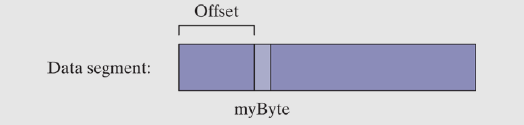
OFFSET operatuor returns the offset of a data label, from the beginning of the data segment.
Examples
.data
	bVal  BYTE  ?  ; OFFSET bVal  = 00404000h
	wVAL  WORD  ?  ; OFFSET wVal  = 00404001h
	dVAL  DWORD ?  ; OFFSET dVal  = 00404003h
	dVal2 DWORD ?  ; OFFSET dVal2 = 00404007h
if bVal were to be located at offset 00404000, then OFFSET operator would return the commented values
OFFSET can be also applied to a direct-offset operand.
Suppose myArray WORD 1, 2, 3, 4, 5. To get offset of the 3rd integer in the array, we'll do mov esi, OFFSET myArray + 4
Also initialization of variable with the offset of another is possible. If we create bigArray DWORD 500 DUP(?), we can also create the pointer pArray DWORD bigArray, pointing to the beginning of bigArray.
pointer has to be a DWORD (for 32-bit)
ALIGN
ALIGN directive aligns a variable on byte, word, doubleword or paragraph boundary. The syntax is $$\text{ALIGN bound}$$where bound can be 1, 2, 4, 8 or 16.
It is useful, as CPU can process data stored at even-numbered addresses more quickly than those at odd-numbered ones.
PTR
PTR operator can be used to override the declared size of an operand. It's only needed when trying to access the operand using a size attribute that is different from the assumed one by the assembler.
For example, to move the lower 16 bits of myDouble DWORD 12345678h into AX, we have to use:
.data
	myDouble DWORD 12345678h
.code
	mov ax, myDouble                 ; error
	mov ax, WORD PTR myDouble        ; moves 5678h into AX
	mov ax, WORD PTR [myDouble + 2]  ; moves 1234h into AX
As we remember that computers store data in ltitle-endian format, to move higher 16 bits, we have to offset the myDouble by 2.
Moving Smaller Values into Larger Destinations
To move two smaller values from memory to a larger destination operand, we can do something like:
.data
	wordList WORD 5678h, 1234h
.code
	mov eax, DWORD PTR wordList ; EAX = 12345678h
TYPE
TYPE operator returns the size of a variable (single element) in bytes.
| TYPE | Value |
|---|---|
| BYTE | 1 |
| WORD | 2 |
| DWORD | 4 |
| QWORD | 8 |
LENGTHOF
LENGTHOF counts number of elements in array, defined by the values appearing on the same line as it's label.
.data
	byte1    BYTE  10, 20, 30        ; LENGTHOF = 3
	array1   WORD  30 DUP(?), 0, 0   ; LENGTHOF = 30 + 2 = 32
	array2   WORD  5 DUP(3 DUP(?))   ; LENGTHOF = 5 * 3 = 15
	array3   DWORD 1, 2, 3, 4        ; LENGTHOF = 4
	digitStr BYTE "12345678", 0      ; LENGTHOF = 9
	myArray1 BYTE 10, 20, 30, 40     ; LENGTHOF = 4
			 BYTE 50, 60, 70, 80
	myArray2 BYTE 10, 20, 30, 40,    ; LENGTHOF = 8
				50, 60, 70, 80
The difference between myArray1 and myArray2 is that at the end of the first line (with label) of myArray2 there is a comma, which continues the list on initializers onto the next lane, and no type declaration on the next line
SIZEOF
SIZEOF operator returns value equivalent to multiplying LENGTHOF by TYPE
Example:
.data
	intArray WORD 32 DUP(0)
.code
	mov eax, SIZEOF intArray  ; EAX = 64
LABEL
LABEL directive allows to insert a label and give it a size attribute without allocating storage. This can be used to provide an alternative name and size attribute for a variable declared next.
In the first example, the val16 label will allow us to use part of the val32 variable. In the second one, val1 and val2 will be used to create parts of LongValue
.data
	val16 LABEL WORD
	val32 DWORD 12345678h
.code
	mov ax, val16        ; AX = 5678h
	mov dx, [val16 + 2]  ; DX = 1234h
=====================================
.data
	LongValue LABEL DWORD
	val1 WORD 5678h
	val2 WORD 1234h
.code
	mov eax, LongValue   ; EAX = 12345678h
Indirect Addressing
Direct addressing isn't common for array processing due to its impracticality and constant offsets to address. Instead, we use a register as a pointer - indirect addressing. An operand using indirect addressing is called an indirect operand
Indirect Operands
Protected Mode
Any general-purpose register can be used as an indirect operand when surrounded by brackets. The register is assumed to contain the address of some data. Example usage:
.data
	byteVal BYTE 10h
.code
	mov esi, OFFSET byteVal
	mov al, [esi]            ; AL = 10h
Indirect addressing can be also used to write data into the memory. If an indirect operand is a destination, data will be written into the memory pointed to by the register
mov [esi], bl
Using PTR with Indirect Operands
Operand size may not be always evident from the instruction context, which will create an assembler error
inc [esi] ; error: operand must have size
The assembler doesn't know what size is ESI. To fix this, a PTR operator is used to declare the operand size
inc BYTE PTR [esi]
Arrays
Indirect operands are ideal for stepping through arrays
.data
	arrayW WORD 1111h, 2222h, 3333h
.code
	mov esi, OFFSET arrayW
	mov ax, [esi]    ; AX = 1111h
	add esi, 2
	mov ax, [esi]    ; AX = 2222h
	add esi, 2
	mov ax, [esi]    ; AX = 3333h
	add esi, 2
Indexed Operands
An indexed operand adds a constant to a register to generate an effective address. Any 32-bit general-purpose register can be used as index register. There are two basic formats permitted by MASM (brackets are required)
	constant[reg]
	[contant + reg]
Where in place of a constant, a variable label may also appear, which creates the most readable format
.data
	arrayB BYTE 10h, 20h, 30h, 40
.code
	mov esi, 2
	mov al, arrayB[esi]    ; AL = 30h
Adding Displacement
Another format for indexed addressing, besides using a variable name combined with a register, is a register and a constant offset. The index register holds the base address of any structure, and the constant points to the offset around that index.
.data
	arrayW WORD 1000h, 2000h, 3000h
.code
	mov esi, OFFSET arrayW
	mov ax, [esi]      ; AX = 1000h
	mov ax, [esi + 2]  ; AX = 2000h
	mov ax, [esi + 4]  ; AX = 3000h
	mov ax, [4 + esi]  ; AX = 3000h
Real-Address Mode
In real-address mode, programs can only use 16-bit regster in indexed operands. Examples:
	mov al, arrayB[si]
	mov ax, arrayW[di]
	mov eax, arrayD[bx]
Similarly to the indirect operands, avoid using BP with anything other than addressing data on the stack
Size Factors in Indexed Operands
Indexed operands must take the size of each array element into the account during offset calculations.
In the below example, as we're using a DWORD array, we multiply the index of the value by its size to get the offset of the array element
.data
	arrayD DWORD 100h, 200h, 300h, 400h
.code
	mov esi, 3 * TYPE arrayD   ; offset of arrayD[3]
	mov eax, arrayD[esi]       ; EAX = 400h
In x86, we can also generate the offset by multiplying values inside the operands brackets. This allows for a more clear, readible code
.data
	arrayD DWORD 100h, 200h, 300h, 400h
.code
	mov esi, 3
	mov eax, arrayD[esi * 4]
Or even more flexible
.code
	mov esi, 3
	mov eax, arrayD[esi * TYPE arrayD]
Pointers
A variable containing the memory address of another variable is called a pointer
Pointers are great tools for manipulating arrays and data structures because the addresses they hold can be modified at runtime. WE can ues a system call to allocate a block of memory and save the address of that block.
A pointer's size depends on the processor mode (32-bit/64-bit)
.data
	arrayB byte 10h, 20h, 30h, 40h
	ptrB dword arrayB        ; pointer to the first arrayB value
	ptrB dword OFFSET arrayB ; even more implicit relationship declaration
As we're focusing on 32-bit programs, the pointers are stored in DWORD variables.
TYPEDEF
TYPEDEF operator creates a user-defined type that appears in the same context as built-in types when defining variables.
It's ideal usage is for creating pointer variables. We can declare a new data type PBYTE that is a poitner to 8-bit data
PBYTE TYPEDEF PTR BYTE
Control Transfer
JMP and LOOP Instructions
CPU loads and executes programs sequentially, in order they appear in the code (not exactly true as it's optimized, but generally). But sometimes, it's required to jump - 'transfer control' to a new location in the program. It can be done unconditionally, or based on the values of CPU status flags. Assembly uses conditional instructions to implement HLL statements like IF and loops. Conditional statements may transfer control (jump) to different memory address. That transfer of control is called branch.
Two basic types of transfers:
- Unconditional Transfer - control is transferred to location in all cases. New location is loaded into instruction pointer using
JMP - Conditional Transfer - branch occurs on certain conditions met. Wide variety of conditional transfer instructions can be combined to create conditional logic structures. The CPU computes whether the branch should occur based on the contents of ECX and flags registers
JMP Instruction
JMP instruction causes unconditional transfer to a destination identified by a code label (assembler translates it into an offset)
JMP destination
During execution, the destination offset is moved into the instruction pointer
Creating a Loop
Using JMP instruction, we can create a simple, endless loop
top:
	...
	jmp top
LOOP Instruction
LOOP instruction, formally Loop According to ECX Counter executes the branch using ECX as the counter, decrementing it each time loop appears
LOOP destination
The loop desination must be within LOOP instruction has steps:
- decrement ECX by 1
- compare ECX to 0
- if ECX not equal 0, jump. Otherwise, move past the loop
If the ECX will be initialized to 0 before starting the loop, the first loop check will decrement ECX to
If the loop jump is too large, an error will be generates by MASM:
error A2075: jump destination too far : by 14 byte(s)
It's advised not to modify ECX inside the loop, as it might create unwanted results in the operation of the loop
Nested Loops
When using loop inside another loop, special consideration has to be made to make sure the count is correct. It's considered too difficult to write more than two level deep loops. In that case, using subroutines is suggested
.data
	count DWORD ?
.code
	mov ecx, 100      ; set outer loop count
L1:
	mov count, ecx    ; save outer loop count
	mov ecx, 20       ; set inner loop count
L2:
	...
	loop L2           ; repeat inner loop
	mov ecx, count    ; restore outer loop count
	loop L1           ; repeat outer loop
Summing an Integer Array
The most basic array-based task is to calculate the sum of elements in an array. A code for that:
.386
.model flat, stdcall
.stack 4096
ExitProcess PROTO, dwExitCode:DWORD

.data
	intArray DWORD 10000h, 20000h, 30000h, 40000h
.code
main PROC
	mov edi, OFFSET intArray    ; EDI = address of intArray
	mov ecx, LENGTHOF intArray  ; initialize loop counter
	mov eax, 0                  ; sum = 0
L1:
	add eax, [edi]              ; add integer to the sum
	add edi, TYPE intArray      ; point to next element
	loop L1                     ; repeat until ECX = 0

	invoke ExitProcess, 0
main ENDP
END main