Chapter 5
Stack Operations
Stack can be visualized by a stack of plates. It's impossible to access freely plates from the middle or bottom of the stack, but very easy to do it from the top of it. New plates can be added on top of the stack, but never to the bottom or middle without additional effort.
Stack Data Structure - new values are added on top of the stack, and existing values are removed from the top. Stacks are useful structures for variety of aplications, and can be easily impemented using OOP methods. A stack is called a LIFO structure (Last-In, First-Out) - last value put into the stack is the first one taken out
Runtime Stack (32-Bit Mode)
Runtime Stack is a memory array managed directly by CPU, used to track subroutine return addresses, procedure parameters, local variables, and other subroutine-related data. In 32-bit mode, the ESP register (Stack Pointer Register) holds 32-bit offset into some location on the stack. ESP is rarely manipulated directly, instead it's modified by instructions like CALL, RET, PUSH, and POP.
ESP always points to the last value added on the stack
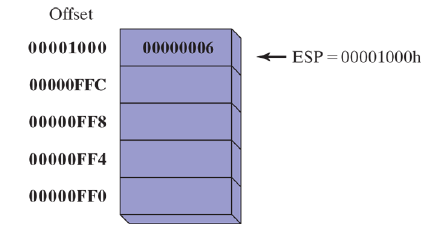
Stack is growing downward, from high addresses to lower ones
Push Operation
Push Operation decrements the stack pointer by the appropriate amount according to the instruction operand's size and copied a value into the location in the stack references by the stack pointer. If the operand size is 32 bits, stack pointer is decremented by 4.
Pop Operation
Pop Operation returns a copy of the value in the stack references by the stack pointer, and increments the stack pointer by the size of the instruction operand. For 32-bit operand, stack pointer is incremented by 4. After the values is popped, the stack pointer points to the next-highest location in the stack.
The pop returns a copy, because the values on the stack are immutable directly. To change a value, it has to be popped, changed in a register or memory, and then pushed back onto the stack.
Stack Applications
- Stack is a convenient temporary save area for registers when they are used for more than one purpose. After they are modified, they can be restored to their original values
- When
CALLinstruction is executed, CPU saves the current subroutine return address on the stack - When calling a subroutine, input values (arguments) are pushed onto the stack
- The stack is a temporary storage for local variables for subroutines
PUSH and POP Instructions
PUSH Instruction
PUSH first decrements ESP then copied a source operand into the stack. A 16-bit operand decrements ESP by 2, 32-bit by 4. Instruction formats:
POP Instruction
POP first copies the contents of the stack element pointer to by ESP into a 16-bit or 32-bit destination operand, then increments ESP by the operands' size
PUSHFD and POPFD Instructions
PUSHFD instruction pushes 32-bit EFLAGS register onto the stack, and POPFD pops the stack into EFLAGS
MOV instruction cannot be used to copy the flags to a variable, so PUSHFD is the best way to save the flags. It's generally advised to move the PUSHFD result immediately into a register/memory by POP.
PUSHAD, PUSHA, POPAD, POPA Instructions
PUSHAD instruction pushes all of the 32-bit general-purpose registers onto the stack in the following order: EAX, ECX, EDX, EBX, ESP, EBP, ESI, EDI
POPAD instruction pops the same registers off the stack in reverse order
PUSHA instruction pushes 16-bit general-purpose registers in above order
POPA instruction pops them back in the reverse order
Reversing a String Using Stack
.386
.model flat, stdcall
.stack 4096
ExitProcess PROTO, dwExitCode:DWORD

.data
	aName BYTE "Abraham Lincoln", 0
	nameSize - ($ - aName) - 1

.code
main PROC
	mov ecx, nameSize
	mov esi, 0
L1:
	movzx eax, aName[esi] ; get character from the string
	push eax              ; push on stack
	inc esi
	loop L1

	mov ecx, nameSize
	mov esi, 0
L2:
	pop eax               ; get character from the stack
	mov aName[esi], al    ; store in string
	inc esi
	loop L2

	INVOKE ExitProcess, 0
main ENDP
END main
Defining and Using Procedures
It is useful to divide complicated programs into subroutines. It simplifies coding, reading, understanding, implementing, and testing of the code.
In assembly, subroutines are called procedures
PROC Directive
Defining a Procedure
Informally, procedure is a named block of statements that ends in a return statement. Procedure is declared using PROC and ENDP directives. It must have a valid name (identifier). Throughout the previous examples, main was used as the name of the procedure
main PROC
	...
main ENDP
When creating a procedure to be used inside the main procedure, it must (or should) end with a RET instruction. It forces the CPU to return to the procedure caller.
sample PROC
	...
	ret
sample ENDP
Labels in Procedures
By default, code labels are only visible inside the procedure they are declared in. To work around this limitation and declare a global label, a double color must be placed after its name
Destination::
It's not a good idea to jump or loop outside the current procedure, as they have an automated way of managing the runtime stack. Transferring control outside of it is a simple way to corrupt the runtime stack
Example Procedure - SumOfThree
The below procedure calculates sum of three 32-bit integers, passed in EAX, EBX, and ECX. The sum is returned in EAX
SumOfThree PROC
	add eax, ebx
	add eax, ecx
	ret
SumOfThree ENDP
Documenting Procedures
A good habit is to add a clear and readable documentation to procedures. The most important information are:
- Description of all tasks done by the procedure
- List of input parameters and their usage, as well as specific requirements for them
- Description of return values
- List of special requirements (preconditions)
Functions written in HLL languages like C or C++ typically 8-bit values in AL, 16-bit in AX, and 32-bit in EAX
CALL and RET Instructions
CALL instruction calls a procedure by directing the processor to begin execution at a new memory location. The procedure uses RET (return from procedure) to come back to the point where the procedure waas called.
Mechanically, CALL pushes its return address onto the stack and copied the called procedure's address into the instruction pointer. RET pops the return address from the stack into the instruction pointer.
In 32-bit mode, CPU executes instruction pointed to by EIP, in 16-bit mode, by IP.
CALL statement typically requires 5 bytes of machine code.
Nested Procedure Calls
A nested procedure call occurs when called procedure calls another procedure before finishing itself. This causes multiple return addresses to live on the stack. It's extremely important to keep track of the values on the stack as wrong management of it will result in losing the return addresses
Passing Register Arguments to Procedures
It's a bad habit to include references to multiple specific variable names inside the procedure. A better approach is to pass the offset of an array containing the variables to the procedure and a number of the array elements.
Considering previous example - calculating sum of the numbers - rewriting the procedure into passing an offset of an array and number of values to calculate might be a better, more useful piece of code
; ESI = array offset
; ECX = number of elements
ArraySum PROC
	push esi
	push ecx
	mov eax, 0
L1:
	add eax, [esi]
	add esi, TYPE DWORD
	loop L1

	pop ecx
	pop esi
	ret
ArraySum ENDP
Nothing in this procedure is specific to an array name or size, thus making it a good, flexible procedure.
Saving and Restoring Registers
In the previous ArraySum example, ECX and ESI were pushed on stack at the beginning of the procedure, and popped at the end to ensure they remain the same at the end of execution.
This is a common behaviour to ensure that the register values won't get overwritten by the procedure execution.
The exception, of course, comes when we want to return a certain value, typically EAX. Then, we don't push/pop those registers.
USES Operator
USES operator, coupled with PROC directive allows for a convinient listing of all registers that one might want to save and restore within a procedure. Assembler, encountering USES, adds PUSH instructions for all of the listed registers at the beginning of the procedure, and POP in reverse order, at the end of the procedure.
The USES operator is placed immediately after PROC, and registers listed are separated only by a space, no commas.
ExampleFunc PROC USES esi ecx
	...
	ret
ExampleProc ENDP
================== GETS ASSEMBLED INTO ====================
ExampleFunc PROC
	push esi
	push ecx
	...
	pop ecx
	pop esi
	ret
ExampleFunc ENDP
Linking to an External Library
Throughout the course, the Irvine32.lib and Irvine64.obj libraries will be used, for simplification of processes like input-output, which can be very time consuming to write.
Link Library
A file containing procedures that have been already assembled into machine code is called a link library. Link library may consist of multiple source code files, which are assembled into object files, then combined into a link library file.
When using a procedure from link library, suppose WriteString, the link library has to be included in the beginning of the assembly file. The source code containing WriteString must contain a PROTO directive identifying the procedure
WriteString PROTO
...
Next, the CALL instruction executed WriteString
call WriteString
The assembler leaves the target address of the CALL instruction blank, as it will get filled in by the linker. The linker searches for the procedure (WriteString in our example) in the link library and copies appropriate machine instructions from the library into the executable, adding the final address of the procedure into the CALL instruction.
The link library code doesn't get fully copied into the final executable. Only the used procedures (called from the assembly code) are copied into the executable.
Linked Command Options
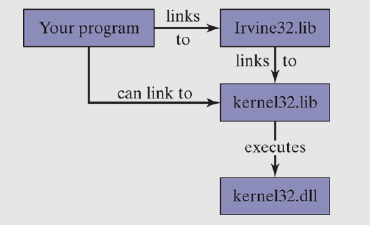
The linker utility combines program's object file with object files and link libraries. The following command links hello.obj, irvine32.lib, and kernel32.lib together:
link hello.obj irvine32.lib kernel32.lib
Linking 32-bit Programs
kernel32.lib file is a part of the MS Windows Software Development Kit, containing linking information for system functions located in a file names kernel32.dll. .dll is a one of the most important types of Windows files, called dynamic link library. kernel32.dll contains functions performing character-based I/O
The Irvine32 Library
There is no Microsoft-sanctioned standard library for assembly. The Irvine32 library is created to make the basic functions much simpler for learning assembly programming. It provides a simple interface for input-output for beginners. The available procedures in the Irvine32 library:
- CloseFile
- Clrscr
- CreateOutputFile
- Crlf
- Delay
- DumpMem
- DumpRegs
- GetCommandTail
- GetDateTime
- GetMaxXY
- GetMseconds
- GetTextColor
- GotoXY
- IsDigit
- MsgBox
- MsgBoxAsk
- OpenInputFile
- ParseDecimal32
- ParseInteger32
- Random32
- Randomize
- RandomRange
- ReadChar
- ReadDec
- ReadFromFile
- ReadHex
- ReadInt
- ReadKey
- ReadString
- SetTextColor
- Str_compare
- Str_copy
- Str_length
- Str_trim
- Str_ucase
- WaitMsg
- WriteBin
- WriteBinB
- WriteChar
- WriteDec
- WriteHex
- WriteHexB
- WriteInt
- WriteStackFrame
- WriteStackFrameName
- WriteString
- WriteToFile
- WriteWindowsMsg
The Win32 Console Window
The Win32 console window (or command window) is a text-only windows created by MS Windows when a command prompt is displayed.
A file handle is a 32-bit integer used by the Windows OS to identify a file that is currently open. When a program calls a Windows service to open/create a file, the OS creates a new file handle and makes it available to the program. Each time a call is made to an OS service to read/write to the file, the same file handle must be passed as parameter
In Irvine32 library, the file handle must be pushed onto runtime stack
The Irvine64 Library
The 64-bit Irvine64.obj library has limited possibilities compared to the 32-bit one, helping only in the basic I/O operations.
Available procedures:
- Crlf
- Random64
- Randomize
- ReadInt64
- ReadString
- Str_compare
- Str_copy
- Str_length
- WriteInt64
- WriteHex64
- WriteHexB
- WriteString
Calling 64-bit Subroutines
To call a subroutines, one must place input parameters in the proper registers, and execute CALL instruction.
The main difference from the 32-bit programming is that every procedure has to be identified at the beginning of the assembly program, using PROTO directive
ExitProcess PROTO
WriteHex64  PROTO
...
.data
	...
.code
	...
The x64 Calling Convention
Microsoft has a specified way for passing parameters and calling procedures in 64-bit programs called Microsoft x64 Calling Convention. It's used by C/C++ compilers and the Windows Application Programing Inteface (API). It's required to follow it when writing a function for one of those languages/interfaces.
Basic characteristics:
CALLsubtracts 8 from RSP (stack pointer), since addresses are 64 bits long- The first four parameters passed to procedure are in RCX, EDX, R8 and R9. The additional parameters are push on the stack, in left-to-right order.
- Caller must allocate at least 32 bytes of shadow space no the runtime stack, so the called procedures can save the register parameters
- When calling a subroutine, RSP must be aligned on a 16-byte boundary. The
CALLinstruction pushes an 8-byte return address on the stack, so the calling program must subtract 8 from the RSP in addition to the 32 it already subtracts for the shadow space.
Sample Program
An example program AddFour passes four parameter registers, and saves the sum in RAX. Procedure values typically return integers in RAX, so the calling program expects the output to be placed there.
ExitProcess PROTO
WriteInt64  PROTO
Crlf        PROTO

.code
main PROC
	sub rsp, 8       ; align stack pointer
	sub rsp, 20h     ; resever 32 bytes for shadow params

	mov rcx, 1       ; set parameters
	mov rdx, 2
	mov r8, 3
	mov r9, 4
	call AddFour

	call WriteInt64  ; display result
	call Clrf
	mov ecx, 0
	call ExitProcess
main ENDP

AddFour PROC
	mov rax, ecx
	add rax, edx
	add rax, r8
	add rax, r9
	ret
AddFour ENDP

END
Line 7 aligns the stack pointer to an even 16-byte boundary. Before OS calls main, we assume the stack pointer is aligned on a 16-byte boundary. Then, when the OS starts the program by calling the main procedure, the CALL (main) isntruction pushed 8-byte return address on the stack. Subtracting another 8 bytes moves the stack back onto 16-byte alignment.
Runtime stack for this program will look like so:
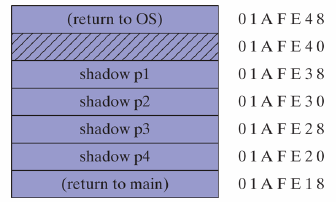
In line 19, there is a call to end the program. If the program requires a return rather and ending, we have to restore the stack pointer back to its starting alignment and using RET instruction
	...
	call Crlf

	add rsp, 28h     ; restore stack (8 + 32 bytes)
	mov ecx, 0       ; process return code
	ret              ; return to the OS